Read Incoming
Read Incoming reaches into the conversation history and extracts data from the customer's most recent message — its text content, its attachments, or both — storing each in its own flow variable. It does not send anything or wait for a reply. It reads what is already there.
This is the key distinction from Ask File and Ask Question: those nodes prompt the customer and suspend the flow until a response arrives. Read Incoming does neither — it looks backward at what has already been received, captures the data, and advances immediately.
In email flows, the node appears as Read Reply and its labels change to refer to email body and email attachments. The behavior is identical. See Email connectors for channel setup.
When to Use It
Capturing the trigger message. When an inbound message or email starts a flow, that message exists in the conversation before any node runs. Read Incoming lets you access its content — useful when the customer's initial message contains the data you need, and the flow should react without asking anything first.
Reading a reply you did not ask for with a node. A Message told the customer to send their invoice, and the flow ended; when they write back and the flow starts again, Read Incoming captures the text and the files of that message.
Email body processing. In email flows, capture the full reply body with Read Incoming, then pass the variable to Extract Information to pull structured fields from what the customer wrote.
Configuration
| Option | Description |
|---|---|
| Store message body | Toggle on to save the text content of the last customer message to a variable. If the customer sent only an attachment with no text, the variable is set to an empty string — not left unset. |
| Body variable | The variable that receives the message text. |
| Store attachments | Toggle on to save any attached files as signed links (60-minute expiry). |
| Attachments variable | The variable that receives the files. Its declared type decides the shape: array keeps every file as a list; attachment keeps one file. See below. |
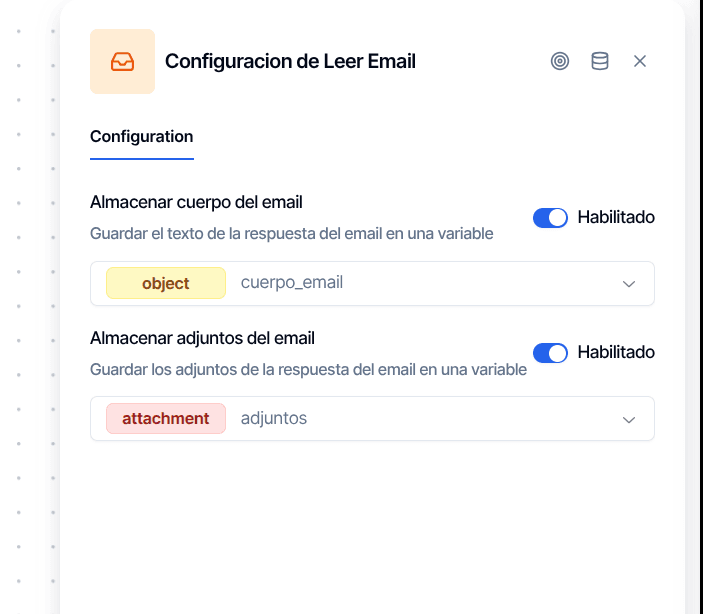
The node reads exactly one message: the most recent one from the customer, sorted by timestamp. It does not scan the full thread or reach further back in history. If neither toggle is enabled, the node does nothing and advances immediately.
One File or a List
The attachments variable always has the shape its declared type promises, no matter how many files the customer attached:
- Type
array. The variable holds the list of files — one, several, or an empty list when the message had none. Nodes that accept several files, such as Document Verifications, Extract Information with per-file results, Send File or a Send Email attachment, read the list directly. The publish gate treats this variable as a list: pointing a single-file node at it — OCR Verification, Face Verification, a Customer Update attachment row — blocks publishing. - Type
attachment. The variable holds the first file. When the customer attached more than one, the rest are dropped and the node leaves a warning notice on the conversation: "The customer sent N files and 'X' is typed 'attachment', so only the first was kept. Declare the variable as 'array' to keep all of them."
Pick the type in the flow's variables panel according to who reads the variable next: single-file nodes want attachment; anything that iterates wants array.
Output Handles
| Handle | When it fires |
|---|---|
| Output | Always. The node has a single output and no error handle. If no customer message exists in the conversation, it leaves a warning notice ("No customer message found in conversation"), sets the body variable to an empty string and the attachments variable to an empty list, and continues — the flow does not stop. |
Notices show in the conversation's notices panel in Chat and aggregated in Flow Notices.
How It Pairs with Other Nodes
Read Incoming is almost always preceded by something that causes a customer message to exist.
With Ask Question. Ask Question already has its own Store attachments toggle, so a reply's text and files can be captured in one node. Read Incoming is the alternative when the message was not requested by an input node — the trigger message, or a reply to a plain Message — or when you want to capture the files of the last message again later in the flow.
Before Extract Information. Capture an email body or the attachments, then pass the variable to Extract Information to pull structured fields — invoice amounts, dates, reference numbers. Declare the attachments variable as array to get one result per file.