OCR Verification
OCR Verification extracts identity data from document images. The customer sends photos of their ID card — front and back — through earlier Ask File nodes, and this node sends those images to a specialized service that reads the document and returns structured data: name, identification number, birth date, expiration date, and other fields printed on the card.
The service currently supports identity documents from Ecuador, Colombia, Mexico, and Guatemala. Ecuador requires both front and back images; the other countries work with just the front, though providing both sides typically yields more complete data.
Configuration
| Option | Description |
|---|---|
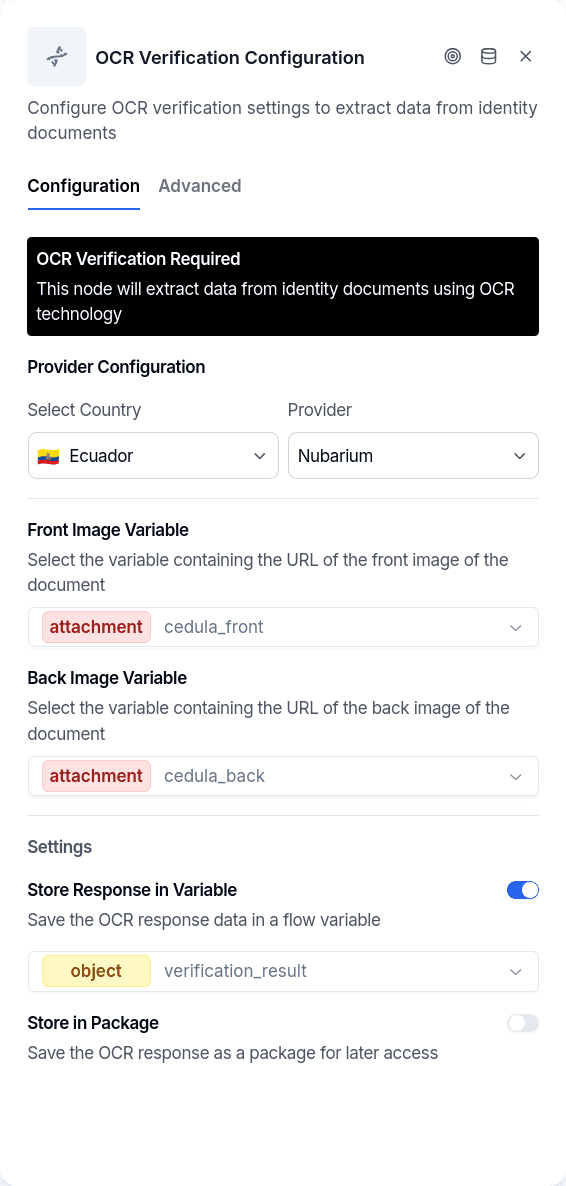
country | Document format to expect: EC, CO, MX, or GT |
provider | OCR provider that reads the document (for example Nubarium) |
frontImageVariable | Variable holding the front image (from Ask File). Required |
backImageVariable | Variable holding the back image (required for Ecuador, optional elsewhere) |
responseVariable | Where to store the OCR output, when Store Response in Variable is on |
storeInPackage | Create an audit record with images and OCR data |
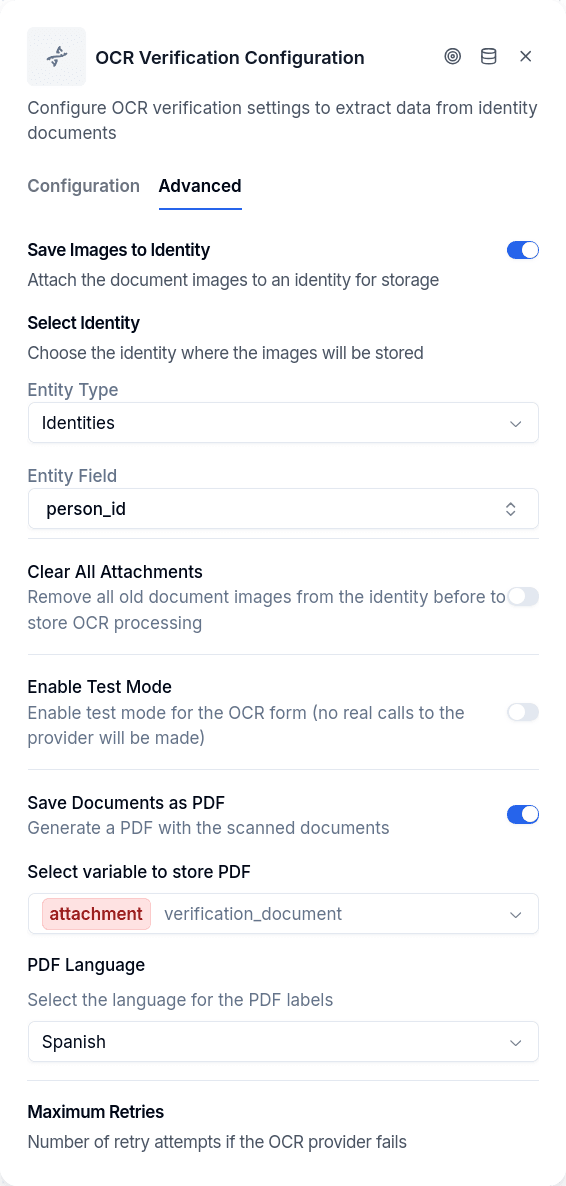
saveImagesToIdentity | Attach images to an existing Identity record (Advanced tab) |
imageIdentityKey | Which identity key to attach images to (e.g., person_id) |
maxRetries | Retry attempts on failure (1-5, default 3), Advanced tab |
testMode | Skips the provider and returns sample Ecuador data |
saveDocumentsAsPdf | Builds a PDF with the scanned document images and stores its link in the variable you pick (Select variable to store PDF), with PDF Language Spanish or English, Advanced tab |
validateNominalList | Asks the INE, through Nubarium, whether the credential that was read is valid in the Lista Nominal (Validate against the INE Lista Nominal). Mexico with Nubarium only; off by default |
nominalListMode | What to do with the result: save (Only save the result, the default) or require (Require it to be valid) |
nominalListVariable | Result variable: object variable that receives the result of the check (when none is picked: ine_lista_nominal) |
The configuration dialog has two tabs. Configuration holds the country and provider dropdowns, the two image variable selectors, the Store Response in Variable toggle with its variable selector, and Store in Package. Advanced holds Save Images to Identity with the identity key, Save Documents as PDF with its variable and language, and Maximum Retries.
The response variable receives the complete OCR output, with extracted fields nested under a data property. To use specific values elsewhere — the identification number in a message, or the name in a Customer Update — follow with a Set Variable node to extract what you need.
Store in Package creates an audit record linked to the borrower containing the full OCR response, copies of both images, and metadata (provider, country, conversation). Enable this for compliance or audit trails.
Save Images to Identity attaches the document images directly to an existing Identity record on the borrower, making them accessible from the borrower's profile. Requires imageIdentityKey to specify which identity.
Save Documents as PDF builds a PDF with the front (and back) image once the OCR succeeded and stores its link in the variable you pick, so a later Send File or a Send Email attachment can deliver it. The variable holds one file. If the PDF cannot be generated, the node still continues and the variable is left unwritten.
Reading the Images from a Variable
A file variable holds either one file or a list of them (an Ask File with Multiple files turned on writes a list). The node resolves each image by the shape of the value, not by the type the variable was declared with, and it needs exactly one file per side:
- One file. The node uses it.
- A list of files. The node uses only the first one and leaves a warning notice on the conversation: "The variable X holds N files; node conversational-ocr-verification only uses the first one. Turn off multipleFiles in the ask-file that writes it, or read the files with a node that accepts several."
- No file. The variable is empty or does not exist. The node leaves a warning notice naming the side it could not read ("The variable X has no file, so node conversational-ocr-verification has no front image to read. Check that the ask-file node that captures it runs earlier in the flow and writes that same variable name.") and exits through Error. The back image is only checked when a back variable is configured.
- Expired link. Files captured by Ask File are signed links that expire 60 minutes after capture. The node renews an expired link on its own; only when the renewal fails twice does it leave an error-level notice ("The file URL expired and could not be renewed. Ask the customer for the file again, or run the node closer to the ask-file that captures it.") and exit through Error.
The publish gate anticipates the first two cases: the flow does not publish when the front or back field points at a variable that holds a list — written by an Ask File with Multiple files, an Extract Information with per-file results, or an attachments capture stored in an array variable — or at a variable that does not exist or is not a file type. It also refuses to publish with an empty front image field. See Publish Gate.
Checking the Credential Against the INE Lista Nominal
The validity date printed on a Mexican voter credential is not enough to tell whether it is still valid. When a person renews or replaces their INE credential, the INE deactivates the previous one in its Lista Nominal (the voter registry) right away. The old card still shows a date in the future, but it is no longer its holder's active credential, and the OCR cannot tell, because it only reads what is printed. Validate against the INE Lista Nominal asks the INE that question, through Nubarium, using the data the OCR already read from the document.
The option only appears once you choose Mexico as the country and Nubarium as the provider, in the Configuration tab below Store in Package, and it is off by default. The check runs after the OCR has read the document. Under What to do with the result you pick one of two modes:
- Only save the result (
save). The result does not change the node's output: the flow continues through Success in every case, and you decide, with a Conditional that reads the variable, what happens to a credential that did not pass. When the credential does not pass, the node also leaves a warning notice with the reason. - Require it to be valid (
require). The flow continues only when the INE answers that the credential is valid and has no theft or loss report. In every other case the node exits through Error with a notice saying why: it is not the latest credential, it is not valid, it has a report, or it could not be validated because the service did not answer, a field had an invalid format, or the OCR did not read one of the fields.
Result variable must be an object variable. If you do not pick one, the result is saved in ine_lista_nominal. The variable is written in both modes, even when the check is not made.
Which Documents Are Checked
Only voter credentials, which the OCR returns with type INE, or IFE for model C. For a passport, an immigration form (FORMA MIGRATORIA), a cédula or any other document, the check is not made: the node leaves a warning notice, writes the variable with validado: false, and the flow continues, in both modes.
What the Check Needs
The INE asks for different data depending on the credential model, and all of it comes from what the OCR read:
| Model | Data the OCR must have read |
|---|---|
| C | Clave de elector (voter code), emission number, and OCR number |
| D | CIC and OCR number |
| E, F, G, and H | CIC and citizen identifier |
If any of them is missing, or the OCR did not identify the model, the check is not made: the node leaves a notice naming the missing field, and the result is marked as not validated. The CIC and the citizen identifier usually come from the machine-readable zone on the back, so ask for both sides.
For model C, the emission number is not the four-digit year printed on the credential. The node takes it from the machine-readable zone or from the registration field, and reports it as missing when it cannot find it.
The Result
| Field | What it holds |
|---|---|
vigente | true when the INE reports the credential as valid, false when it answers that it is not; empty when there was no answer |
esUltimaCredencial | Whether this is the holder's latest credential; false when it was renewed or replaced |
soloIdentificacion | true when the credential is valid as an ID, but not for voting |
reporteRobo | true when the credential has a theft or loss report |
validado | Whether the check was made and the INE answered about the credential |
claveMensaje | Code of the message the INE returned |
estatus | Status the service returned |
mensaje | Text of the message the INE returned |
informacionAdicional | Additional information that comes with the answer |
motivo | The reason, in Spanish, as shown in the notice |
modelo | Credential model the check was made with (C, D, E, F, G, or H) |
modoPrueba | true when the result was simulated by test mode |
respuesta | The provider's full response; empty when no check was made |
These are the answers the INE can give, and how each one shows up in the result:
claveMensaje | INE answer | In the result |
|---|---|---|
3 | Valid, the holder can vote | vigente: true |
11 | Valid only as a photo ID | vigente: true, soloIdentificacion: true |
9 | Voting rights suspended (valid only as an ID) | vigente: true, soloIdentificacion: true |
12 | Credential of a resident abroad | vigente: true |
1 | Not the latest credential: it was renewed or replaced | vigente: false, esUltimaCredencial: false |
0 | Incorrect or non-existent data | vigente: false |
5 to 8 | Format error in the CIC (5), OCR number (6), voter code (7), or emission number (8) | validado: false |
4, empty, or unknown | INE service unavailable, or an answer that cannot be interpreted | validado: false |
A theft or loss report comes separately from the code, so it can accompany any of these answers. When there is one, reporteRobo is true, and in require mode the node exits through Error even if the credential is valid.
validado: false does not mean the credential is not valid; it means there was no answer about it. In save mode, handle that case separately, with a later retry or a manual review, instead of rejecting the customer.
Example
Choose Only save the result and leave Result variable empty, so the result lands in ine_lista_nominal. After the node, add a Conditional with two rules combined with AND: ine_lista_nominal.vigente with is_true, and ine_lista_nominal.reporteRobo with is_false. The TRUE branch continues the onboarding; the FALSE branch goes to a message asking the customer for their most recent credential. To tell an unavailable service apart from a rejected credential, put another Conditional on ine_lista_nominal.validado before it.
Before You Turn It On
Each check has a cost. Every time the node queries the INE through Nubarium, that query is billed. Turn the option on only in the flows that need it.
Every INE answer is recorded. The node stores each real answer as a compact package, with no images, under the source AD_INE_LISTA_NOMINAL_NUBARIUM, even when Store in Package is off.
Test mode does not query the INE. With testMode on, the node writes a simulated answer for a valid credential, with modoPrueba: true, whatever document it read. It makes no check and stores no package.
A valid credential does not prove the sender is its holder. The check confirms the document is valid, not that it belongs to the person in the conversation. Combine it with Liveness Verification and Face Verification.
Output Handles
| Handle | When |
|---|---|
| Success | OCR completed and returned extracted data |
| Error | Missing configuration, missing or unreadable image, the provider could not read the document, extraction failed after retries, or, in require mode, the INE did not confirm the credential is valid |
Every Error exit leaves a notice on the conversation with the cause, visible in the conversation's notices panel in Chat and aggregated in Flow Notices.
Behavior
Retries. A provider error is retried up to Maximum Retries times, waiting five seconds between attempts. When all attempts fail, the node exits through Error with the last provider message in the notice.
A document the provider cannot read is not retried. When the provider answers that it could not identify the document — a blurry, cropped or dark photo — retrying will not help. The node stops immediately and leaves a notice: "The OCR provider could not read the document image (...). Ask the customer for a sharp, well-lit photo of the whole document." Connect the Error handle to a step that asks for the photo again.
Save Images to Identity needs an identified customer and an existing identity. The node looks for an identity with the configured key on the customer of the conversation. When the conversation has no identified customer, or the customer has no identity with that key, the images are simply not attached — the OCR result is still returned and the node still succeeds. Run Login or Create Borrower, and create the identity, before this node.
Store in Package stores copies. The images inside the audit record are uploaded again as part of the package, so they stay readable after the Ask File links expire.
Usage Examples
Basic extraction. Select the country and provider, pick the front (and, for Ecuador, back) image variables written by Ask File, enable Store Response in Variable and choose an object variable such as ocr_response. Follow with Set Variable to pull ocr_response.data.identificationNumber and the names into their own variables, then Customer Update to persist them.
Full audit trail. Same as above, plus Store in Package, and in the Advanced tab Save Images to Identity with the identity key you use for the national ID. Set Maximum Retries to 5 if the provider is occasionally slow.
Flow Integration
Before this node: Login or Create Borrower to identify the customer, then one Ask File per side of the document with Multiple files off.
After it: Set Variable to extract fields, a Conditional to check them, Customer Update to persist them, and often Face Verification to compare a selfie against the same document photo.
Response Samples
The structure of the response varies by country, provider and document version. Below is the shape for Ecuadorian cédulas read by Nubarium — the same sample Test mode returns — and the two error shapes you will meet.
Response Fields
Common fields:
- status - Processing status (
OKorERROR) - validationCode - Unique code for this processing
- messageCode - Result code;
0on success - documentIdentifier - Document type and version (e.g.,
ECU_IdCard_2009orECU_IdCard_2021) - className / subclassName - Document class and version
- documentType - Type of document (e.g.,
ID_CARD) - country - Country code (e.g.,
ECU)
Data fields, 2009 cédula: firstName, lastName, identificationNumber, dateBirth, placeBirth, nationality, gender, maritalStatus, fatherName, motherName, partnerName, educationLevel, occupation, fingerprintId, barcode, issueDate, issuePlace, expiryDate.
Data fields, 2021 cédula: the same personal and family fields plus citizenshipStatus, documentNumber, state, bloodType, organDonor, and the machine-readable zone as mrz with a per-field mrzValidation object (OK when the printed value matches the MRZ).
Error fields:
- messageCode
"1"- Document not identified: the provider could not recognize a document in the image. The node does not retry this one. - messageCode
"2"- Missing input: a required side was not received (Document <front> not found,Document <back> not found).
Things to Know
Processing takes a few seconds. Typical responses come back in 2-10 seconds, but retries can extend this. Consider a "please wait" message before the node.
The extracted fields vary by country. Ecuador's cédula includes education level, occupation, parents' names, marital status — fields other countries' documents don't have. Check the response structure for your specific country.
Test mode returns mock data. The node skips the actual OCR call and returns the 2009 Ecuador sample above, regardless of which country you've configured. When the Lista Nominal check is on, it also simulates a valid credential without querying the INE.
Guide the customer on image quality. Ask for a sharp, well-lit photo of the whole document in the Ask File prompt. Most "document not identified" results come from cropped or dark photos.