Create Borrower
Create Borrower registers a new customer in the system. It's the entry point for people who don't already have a record — typically used when a Login node fails because the customer isn't recognized. The node creates a minimal borrower entity with just a person type and optional label, then hands off to subsequent nodes that collect additional details via Customer Update.
The Typical Pattern
A common onboarding sequence: try to log in, and if that fails, create a new record.
Login checks whether the phone number matches an existing borrower. When it doesn't, the failure path leads to Create Borrower, which establishes the record. Customer Update then collects the actual customer data: identity documents, name, custom fields.
Configuration
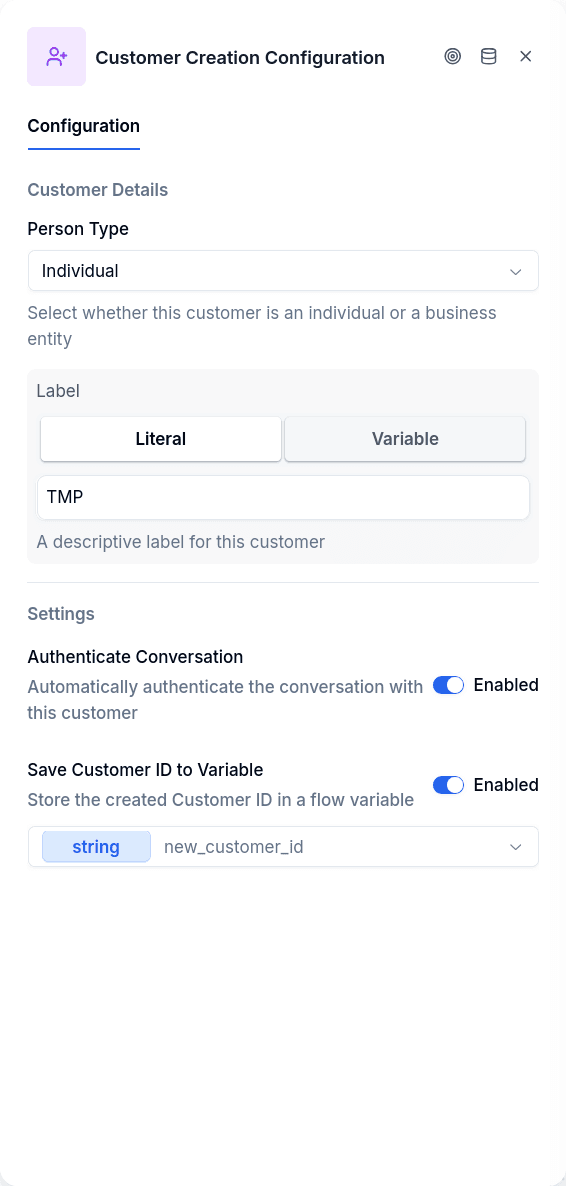
Configure the person type as either individual or business. This determines whether you're creating a natural person or a business entity, which affects what data fields are available on their record later.
The label is a display name. Set it to a literal value like "TMP" as a placeholder, or pull from a variable if you've already collected their name. If the variable doesn't exist at runtime, the node logs a warning and continues with an empty label rather than failing.
Enable authenticate conversation to log the new customer in immediately. This sets the borrower_id on the conversation so subsequent nodes can operate on this customer without a separate Login step. In practice, this should almost always be enabled.
It also decides what happens to consent accepted earlier. When the node creates the customer with Authenticate Conversation on, every authorization accepted through Opt-In earlier in the same conversation, before anyone was identified, is attached to the new customer, and the node leaves an info notice, Authorization linked to customer. The option is off by default, and with it off nothing is attached. It only acts when the node creates: if Find before creating finds a customer that already exists, the conversation is not authenticated and nothing is attached. That is on purpose, because a tax ID is public and authenticating from one would let anyone pass for that customer. To identify a customer who already exists, use Login with OTP. See Opt-In Before Knowing the Customer.
The selected variable stores the new borrower's ID for later reference.
Output Handles
| Handle | When |
|---|---|
| Continue | Borrower created successfully |
| Error | Creation failed (database error) |
The node advances silently — it doesn't send any message to the customer.
What Gets Created
The node creates a borrower with person type and label only. The full borrower schema includes external ID, risk rating, tags, and more — see the Borrowers API for details. To set additional fields, use Customer Update or the API after creation.
New borrowers are automatically assigned to the first step in the tenant's workflow configuration.
Prerequisites
None. Create Borrower is specifically for situations where no borrower exists yet — it's what you use when Login fails. For existing customers, use Customer Update or Read Borrower instead.