POC Verification
POC Verification confirms that a phone number or email address belongs to the customer by sending a one-time code and waiting for them to enter it. When successful, the Point of Contact record gets marked as verified — the isVerified field flips to true. This is contact ownership confirmation, not consent signing.
The distinction from OTP Verification matters. OTP Verification signs an Authorization created by Opt-In — it's part of a consent flow. POC Verification has nothing to do with authorizations. It simply answers the question: does this stored contact actually belong to this person?
When It Runs
The node looks up the borrower's primary contact of the specified type — the Point of Contact record with priority == 1. This means the contact must already exist before verification can happen. The typical pattern is Ask Phone or Ask Email to collect and validate the value, Create Entity to persist it as a POC record, then POC Verification to confirm ownership.
If no primary contact exists for the specified type, the node routes to the error handle. It won't work with contacts stored only in variables — it needs an actual POC record attached to the borrower.
The Customer Experience
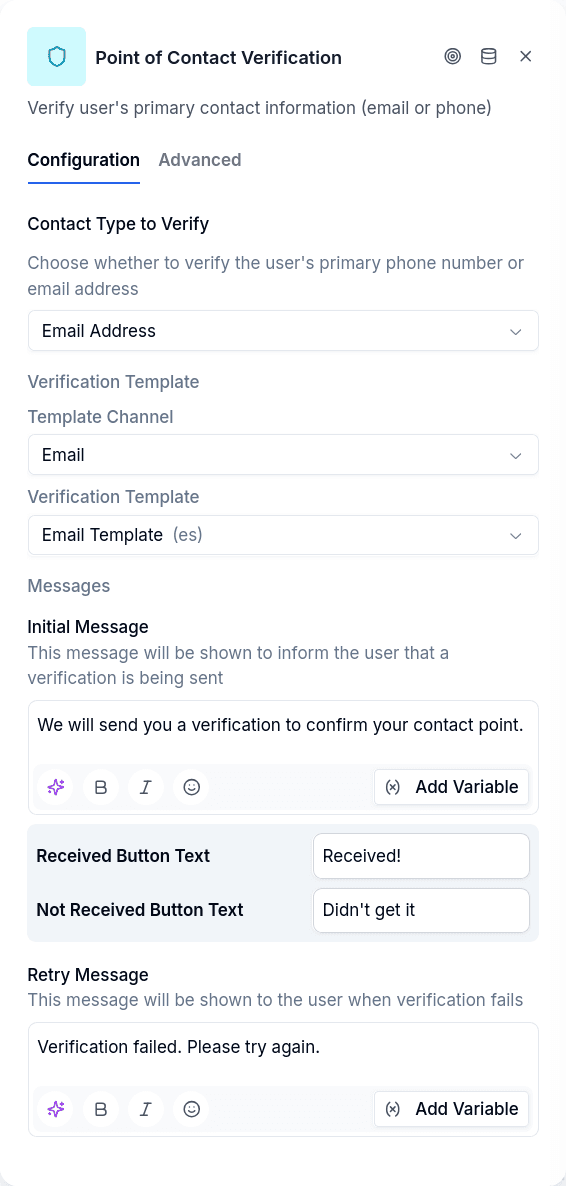
The node presents two buttons: one for "I received the verification" and one for "I didn't receive it". The OTP is sent immediately when the node activates, but the customer isn't prompted to enter the code until they click the first button. This gives them time to check their messages.
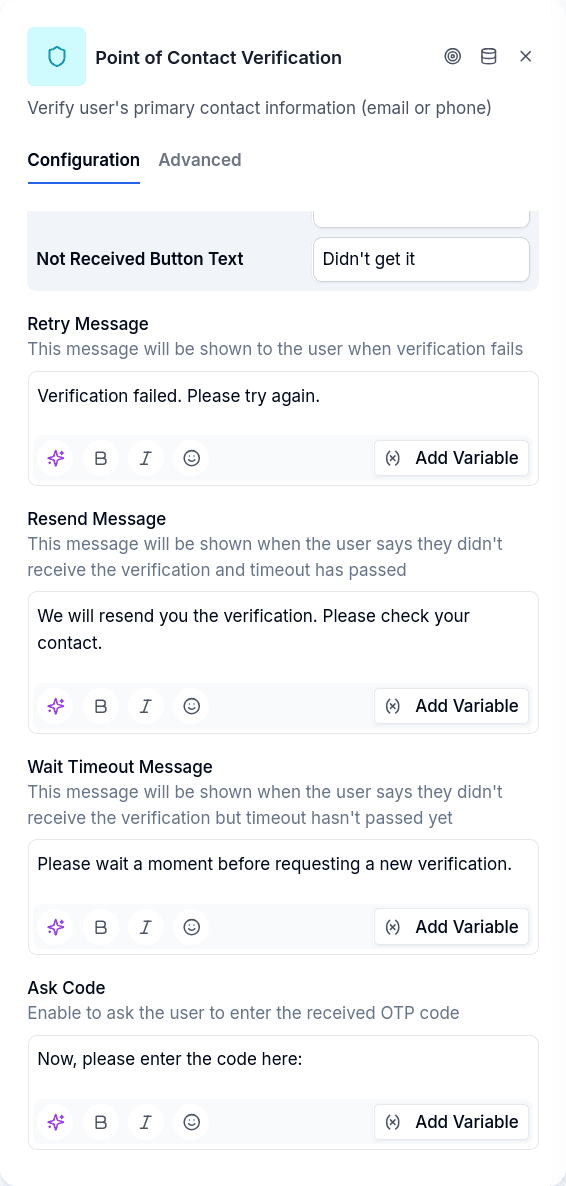
If they click "I didn't receive it", the system checks whether enough time has passed (controlled by the retry timeout). If not, they see a message asking them to wait. If enough time has passed, a new code is sent and they're told to check again.
Once they indicate they received the code, they're prompted to enter it. A correct code marks the POC as verified and advances to the continue handle. An incorrect code triggers the retry message and increments the attempt counter. Too many wrong attempts routes to the timeout handle. An expired code goes there too, unless you give it its own output (see Expired Code vs Exhausted Attempts).
Configuration
| Option | Description |
|---|---|
| Contact Type | Which contact to verify: phone or email |
| Template Channel | How to send the code: SMS or WhatsApp for phone, email for email |
templateId | Message template for the OTP delivery |
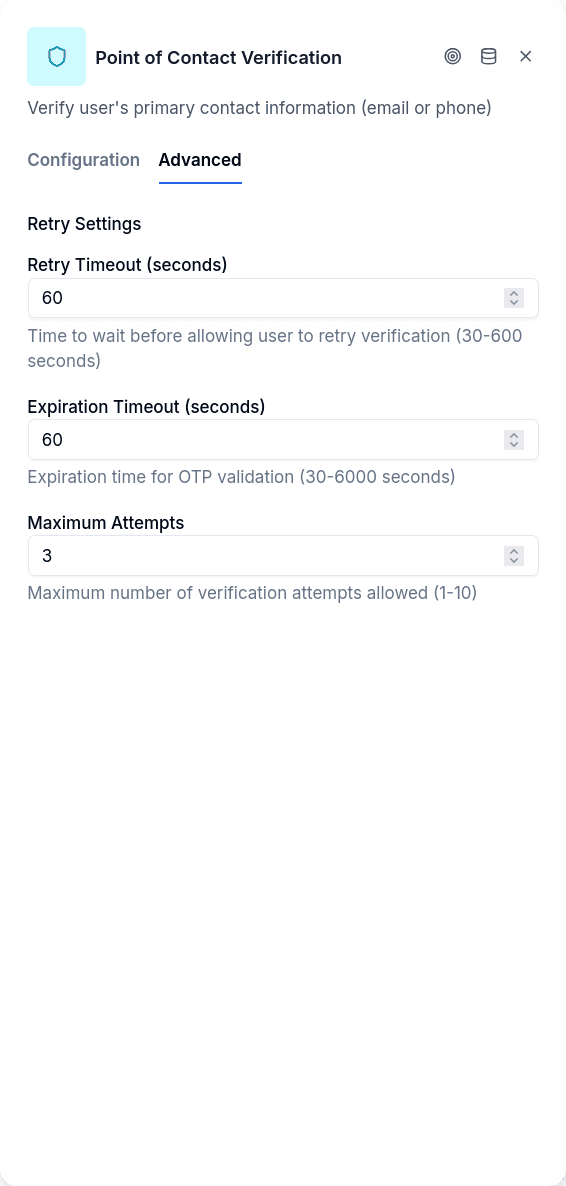
retryTimeoutSeconds | Seconds before resend is allowed (default: 60) |
expirationTimeoutSeconds | How long the code remains valid, in seconds. Minimum 900 (15 minutes): a lower value is raised to 900, and 900 is used when you leave it empty |
| Max Attempts | Wrong code attempts before the attempts run out. Minimum 5: a lower value is raised to 5, and 5 is used when you leave it empty |
| Expired code and exhausted attempts leave through the same output | On by default. Turn it off to give an expired code its own output |
All messages support variable interpolation using {{variableName}} syntax.
Output Handles
Which handles the node shows depends on the Expired code and exhausted attempts leave through the same output toggle. It is on by default, and every node created before the toggle existed behaves as if it were on.
With the toggle on:
| Handle | When |
|---|---|
| Continue | Code verified, POC marked as verified |
| Timeout/Max Attempts | Too many wrong codes, code expired, or the code no longer matches the contact |
| Error | No primary contact found, template missing |
With the toggle off, the timeout output splits in two:
| Handle | When |
|---|---|
| Continue | Code verified, POC marked as verified |
| Attempts exhausted | The customer used up the allowed attempts, or the code no longer matches the contact. It is the same output as Timeout/Max Attempts, with the same connections, under a new name |
| Code expired | The customer answered after the code expired, with attempts still left |
| Error | No primary contact found, template missing |
Expired Code vs Exhausted Attempts
An expired code and a customer who ran out of attempts are different situations. The first one usually only needs a new code; the second one may call for a different path, such as handing the conversation to an agent. Turn the toggle off when your flow needs to treat them differently.
Turning the toggle off doesn't change how the flow behaves. Every connection that leaves Timeout/Max Attempts is copied to Code expired, pointing at the same nodes. Until you rewire Code expired, both cases keep going where they went before.
Turning it back on removes the connections of Code expired. If any of them reaches a node that Attempts exhausted doesn't reach, the editor lists those nodes and asks you to confirm before removing them. If you cancel, nothing changes.
When both apply, exhausted attempts win. A code that has expired and has no attempts left leaves through Attempts exhausted.
A code that no longer matches the contact counts as exhausted. If the stored contact changed between sending the code and the customer entering it, the code belongs to a different contact, and the conversation leaves through Attempts exhausted, never through Code expired.
Expiration is only checked when the customer answers. The node doesn't watch the clock: if the code expires while the customer is silent, the conversation stays where it is. When the customer sends something, the answer is evaluated and, if the code has expired, the conversation leaves through Code expired.
An unconnected Code expired doesn't strand the customer. If the toggle is off and Code expired has no connection, an expired code leaves through Attempts exhausted, as it would with the toggle on, and the conversation gets a warning notice that names the missing Code expired connection. The editor also warns about the unconnected output, without blocking publishing. The opposite case, a connection on Code expired while the toggle is on (for example, in an imported flow), is ignored, and the editor warns about it too.
The Login node doesn't have this toggle. Login with Require OTP checks the code the same way, but its outputs stay as they were.
Prerequisites
The conversation must be authenticated — a borrower must be logged in. The borrower must have a Point of Contact record of the specified type with priority 1. If you're verifying a phone number that was just collected, make sure Create Entity runs first to create the POC record.
The OTP template referenced by templateId must exist in the system configuration.