Create Entity
Create Entity adds a new Address or Point of Contact record to the authenticated borrower's profile. Unlike nodes that collect or update data, this one persists structured records that can have multiple instances — a borrower might have several phone numbers with different priorities, or both a home and work address.
The node doesn't collect anything itself. It takes values that already exist — from variables set by Ask Phone, Ask Location, or other input nodes — and creates the database record. The created entity's ID is stored in a variable for later use, such as triggering POC Verification on the new contact.
A Common Pattern
Create Entity sits between data collection and whatever comes next — often verification.
Ask Phone collects and validates the number. Create Entity persists it as a Point of Contact record with a priority. POC Verification then sends a code to that contact. The verification node needs a POC record to exist — it doesn't work on raw variables.
For addresses, the pattern is similar: Ask Location (or a series of Ask Question nodes) collects the data, Create Entity persists it.
Entity Types
Point of Contact
Creates a phone or email record in the Points of Contact collection. Every POC has three required fields: contact_method (phone or email), value (the actual number or address), and priority (1-5, where 1 is primary).
When you need to verify a phone number or email, you first create it as a POC, then run POC Verification against it. The verification node marks isVerified as true when the customer enters the correct code.
Address
Creates a location record in the Addresses collection. Addresses support many fields — street lines, city, state, country, coordinates, neighborhood — but none are strictly required beyond the borrower association.
If you're using Ask Location, it provides latitude, longitude, and reverse-geocoded components that map directly to address fields. For manual collection, you'll typically use multiple Ask Question nodes, one per field.
Configuration
Each field in the entity can pull its value from a static string or a conversation variable. Static values work for things like contact_method: "phone" that don't change. Variables reference what was collected earlier — the phone variable set by Ask Phone, for example.
Select the entity type (Address or Point of Contact), then map each field you want to set. For each field, choose whether the value is static or comes from a variable. The selected variable stores the new record's ID for later reference.
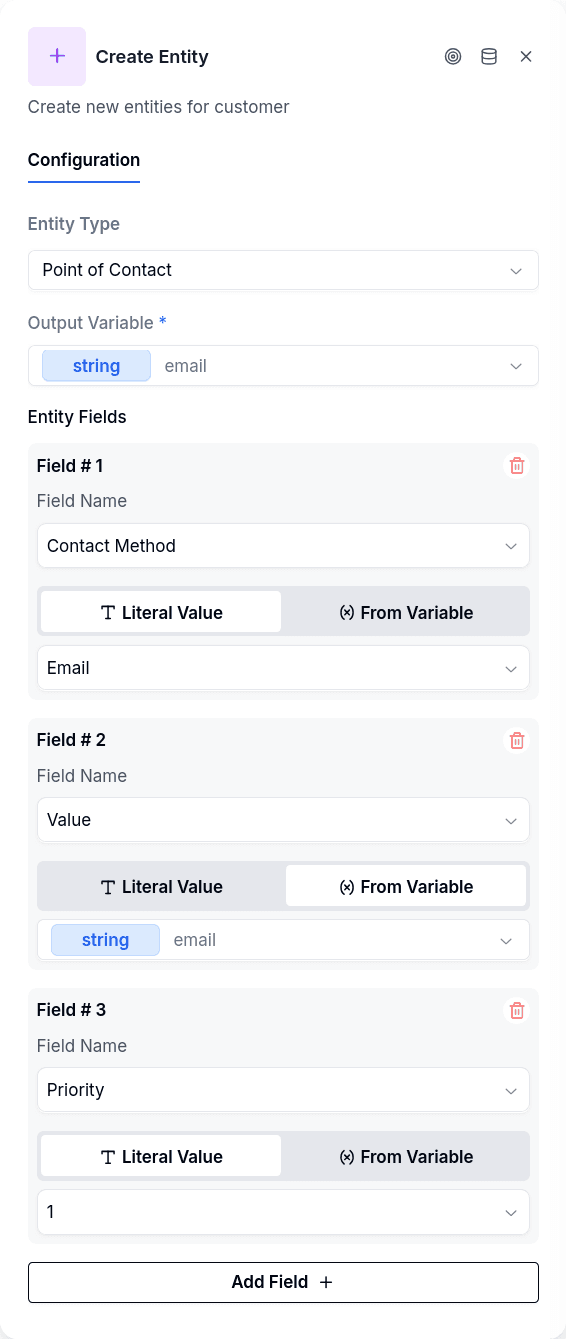
Which Customer Is Written
By default the node writes on the conversation's customer, the one Login or Create Borrower bound to the conversation. Every flow published before this option existed keeps doing exactly that.
Choose Customer ID from a variable and the node creates the entity on another customer: the one whose ID sits in the flow variable you pick. The typical case is a guarantor or co-signer that Create Borrower created a few nodes earlier, leaving its ID in a variable. The ID is checked to exist in the tenant before anything is written.
This mode never falls back to the conversation's customer: an empty variable, one no node wrote, or an ID that is not in the tenant leaves a notice naming what to fix and nothing is written. Publishing is blocked when Customer ID from a variable is selected and the variable is empty.
Output Handles
| Handle | When |
|---|---|
| Continue | Entity created successfully |
The node operates silently — no message goes to the customer. It just persists the record and advances.
Create Entity vs Customer Update
Both nodes save data to the borrower's profile, but they serve different purposes.
Create Entity adds new records to collection entities — things where a borrower can have multiple instances. A person has multiple phone numbers, multiple addresses. Each is a distinct record with its own ID, and Create Entity is how you add one.
Customer Update modifies the borrower directly: identity documents, custom fields, workflow steps. These are singular — a borrower has one national ID value, one record for a given custom field. Customer Update finds or creates by key.
If you just need to store a phone number as text in a custom field, use Customer Update. If you need a verifiable POC record with priority that can later be marked as verified, use Create Entity.
Prerequisites
The conversation must be authenticated — a borrower_id must exist from Login or Create Borrower. Without it, there's no borrower to attach the entity to.
For Points of Contact, all three fields are required: contact_method, value, and priority. Missing any of them causes the creation to fail.
If a variable reference doesn't resolve — the variable was never set — the field receives an empty value rather than throwing an error. This can lead to POC records with blank values if the input node was skipped or failed silently.