Send Credit Line Information
Send Credit Line Information fetches a borrower's credit account from the Credit Management System (CMS) and stores it in a flow variable. The account object includes the current balance, available limit, and status, with the option to include the full history of credit operations.
This is a different node from Send Credits Information. That node retrieves individual loan and debt records; this one retrieves the credit account itself — the DPA (Deferred Payment Account) product family. The product family is not configurable.
Before this node runs, the borrower must be authenticated and their record must have a linked CMS client ID (typically assigned during onboarding). A variable holding the CMS partner ID must also be set earlier in the flow.
Configuration
| Option | Description |
|---|---|
| Partner ID variable | Required. A string-typed variable holding the CMS partner ID. The node uses it to authenticate the CMS request. |
| Include history | When enabled (the default), the fetched account includes the full history of credit operations. |
| Selected variable | An object-typed variable where the credit account will be stored. |
| Send the result as text | Off by default. When on, the node also sends the customer a fixed text with the account's values. See Text for the Customer. |
| Text language | Spanish or English: which of the two fixed texts is sent. Shown when the text is on. |
| Save the text in a variable | Optional. A string variable that receives the same text. |
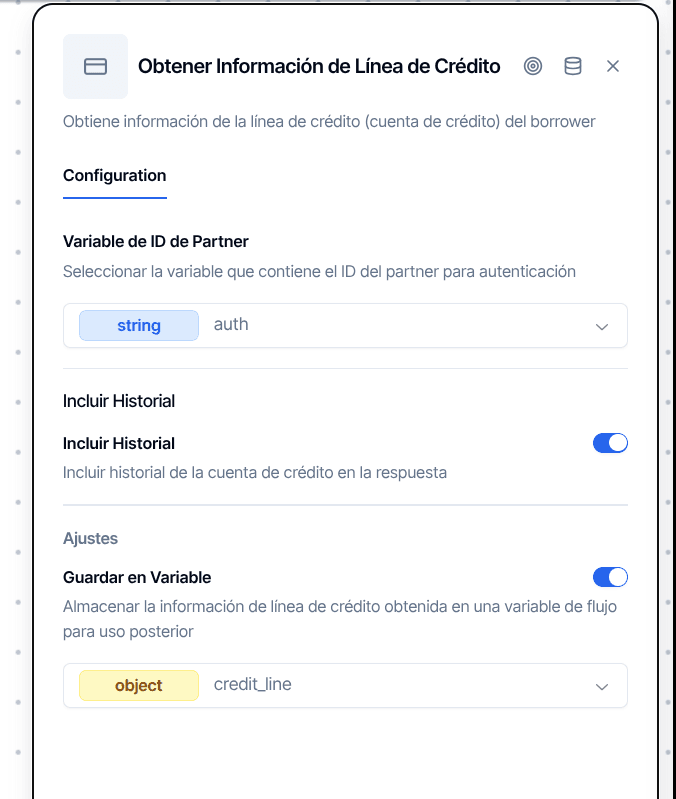
With Send the result as text off, which is the default, the node runs silently and nothing appears in the chat. It works identically across WhatsApp, Web, and Email flows.
Text for the Customer
Under Text for the customer, the Send the result as text switch makes the node send the customer a fixed text with the account it just fetched, so you do not have to build that message from the stored object yourself. The text is not a template and cannot be edited: you only choose its language, and the editor shows a read-only preview with fictitious data.
The values go out exactly as the CMS returns them: the status untranslated, each amount as its number followed by its currency, and - when a value is missing. In Spanish:
In English:
On WhatsApp the text goes out as a WhatsApp message, and on every channel it is saved in the conversation as a message from the bot, which is how the web chat shows it. With Save the text in a variable, the same text is also stored as a string, for example to reuse it in a later message. The full account object is still saved in the Selected variable exactly as before.
On the canvas, the node reads "Sends text to the customer (Spanish)" while the option is on.
When to Use It
Branching on account status. Retrieve the credit account and feed it into a Conditional node to route the flow based on whether the account is active, suspended, or absent.
Displaying balances. Fetch the account before a Message node so you can show values like {{credit_account.available.amount}} or {{credit_account.outstanding.amount}}.
Feeding downstream API calls. Pass the stored credit account object to an HTTP Request or Workflow Execute node that needs credit context.
Output Handles
| Handle | When it fires |
|---|---|
| Continue | Account retrieved successfully |
| Error | Missing partner ID variable, borrower not found, no CMS client ID, API failure, or the text could not be sent |
Things to Know
Always connect the Error handle. Missing partner ID, unresolved borrower, absent CMS client ID, API failure — any of these routes to Error. Without a connected path the flow terminates silently and falls back to the connector's default responder.
Soft failures stay invisible in the conversation. If the partner ID is missing, the borrower is not found, or the CMS client ID is absent, the error is logged on the backend but nothing appears in the conversation. Only CMS API failures (network errors, HTTP errors) surface a visible notice. Check backend logs if the node silently routes to Error.
Flows saved before the text option behave as before. They have no value for Send the result as text, so the node sends nothing and only stores the account object.
The node always uses the first CMS client ID. If the borrower has multiple linked CMS client IDs, only the first one is queried. There is no way to select a different one.