Message
The Message node sends text to the customer without expecting a response. It delivers one or more messages and immediately continues to the next node.
This makes it the workhorse of conversational design. Before you ask for sensitive information, you explain why you need it. After a customer submits documents, you acknowledge receipt. When a backend process takes time, you tell them to wait. The Message node handles all of this.
When to Use It
Before asking for input, a Message can explain what you need and why. Customers who understand the request make fewer mistakes. A brief explanation before requesting a government ID reduces failed attempts and support tickets.
After collecting data, a Message confirms what was captured. After branching logic, it communicates the outcome. During long operations, it manages expectations—silence feels like broken software, so a brief "Processing your information" keeps things moving.
How It Works
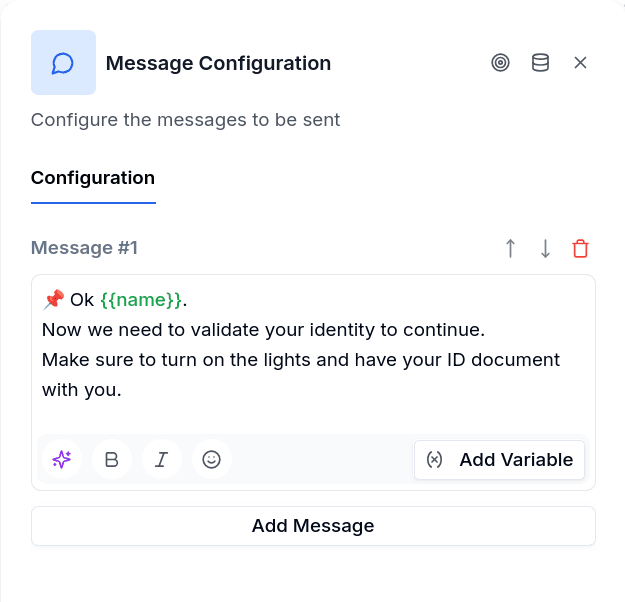
Each Message node contains one or more text entries. Add them through the editor—you can reorder, delete, or use the AI assistant to help draft your text. When the node executes, messages arrive as separate chat bubbles in quick succession, then the flow moves on.
Line breaks are kept exactly as you typed them, both in the text sent and in any variable value it includes.
The description field is for your reference only; it shows on the canvas but never reaches the customer.
The node is available on the WhatsApp and web channels. Email flows do not offer it — an email flow writes with Send Email instead.
Variables
Use {{variable_name}} to personalize messages. Five variables are always available:
{{name}}— the customer's profile name, when the channel provides it{{phone}}— their phone number{{borrower_id}}— their ID in the system{{now}}— current date and time{{today}}— current date
Any variable stored earlier in the flow works too. A variable that nothing has set by the time the node runs is not replaced: the customer sees the placeholder as written, {{variable_name}}, and the node writes one warning notice on the conversation listing every unresolved name — one notice per node, however many placeholders were missing. The publish check warns ahead of time about variables that no node in the flow assigns.
Formatting
Messages support WhatsApp markdown: surround text with *asterisks* for bold or _underscores_ for italics. Emoji work well as visual anchors—✅ for success, ❌ for errors, ⏳ when asking customers to wait.
Multiple Messages
Most nodes use a single message. Multiple messages make sense when content benefits from visual separation—chunking instructions so they don't arrive as a wall of text.
Keep the count reasonable on WhatsApp: Meta limits how many messages a business number can send to the same customer in a short window, and a chain of many Message nodes in a row is the usual way to hit it (see below).
When WhatsApp Rejects the Message
Meta can refuse a send for reasons that have nothing to do with your flow. Each refusal leaves a notice on the conversation that explains, in Spanish, what happened and what to do about it, with the provider's code:
| Situation | What the notice tells you |
|---|---|
| The 24-hour window is closed | More than 24 hours passed since the customer's last message. Free-text messages only arrive inside that window; to write first, use an approved template (a template node or a template campaign). |
| Marketing frequency cap | Meta decided this customer already received too many marketing messages in the period. Do not retry; use a utility template if the message is transactional, or wait for the next period. |
| The customer opted out of marketing | The customer asked to stop receiving marketing from this business. Mark them as not contactable for marketing; only utility or authentication templates can still be sent. |
| Too many messages to the same number in a short time (code 131056) | Reduce the number of consecutive Message nodes — group them into one — and do not retry: every retry makes the limit worse. |
| The template is paused, or the number hit a sending limit | Review the template in Templates and in Meta's WhatsApp Manager, or slow the sending pace. |
None of these is retried by the engine. When Meta accepts the message and reports the failure later, the same explanation arrives through the delivery status as a delivery_failed notice. You read them in the conversation's notices panel in Chat and aggregated by flow and node in Flow Notices.
Failure Behavior
Message nodes don't wait for delivery confirmation: once the channel accepts the message, the flow moves on.
If sending fails — a rejection like the ones above, or a channel error — the node is treated as a failed node. Message has no Error handle, so there is no error path to follow: the engine writes a notice on the conversation ("Node failed without error handling", pointing at the node), abandons the flow and hands the customer to a human agent with the fixed flow_error text described in Human Takeover. If you need a different outcome, keep the Message where a failure is unlikely and let the nodes that can fail (a request, a verification) carry the Error path.