AI Router
AI Router classifies user intent using a language model and routes the conversation accordingly. Unlike Global Keywords which match specific text, or Conditional which evaluates variables, AI Router understands what the customer means. Someone saying "quiero ver mi saldo", "how much do I have?", or "check my balance" all route to the same place.
How It Works
The node sends a prompt to the customer, waits for their response, then runs that response through a two-stage classification pipeline. The first stage interprets the message — extracting intent, keywords, and context. The second stage matches that interpretation against your configured routes and picks the best fit.
Each route has a label (shown in the builder) and a description (what the AI uses to match intent). The quality of routing depends almost entirely on how well you write those descriptions. A description like "Balance" gives the AI little to work with. A description like "User wants to check their current account balance, available credit, or see recent transactions" gives it the context it needs to match varied phrasings.
When to Use It
AI Router shines when customers can express the same intent many different ways. A main menu where someone might say "pay my bill", "hacer un pago", "how do I pay?", or just "payment" — all should route to the same place. Text matching can't handle that variety; semantic understanding can.
The tradeoff is cost and latency. Each classification runs two LLM calls. For high-volume, cost-sensitive scenarios where users pick from a fixed set of options, Interactive Options or Global Keywords may serve better.
Configuration
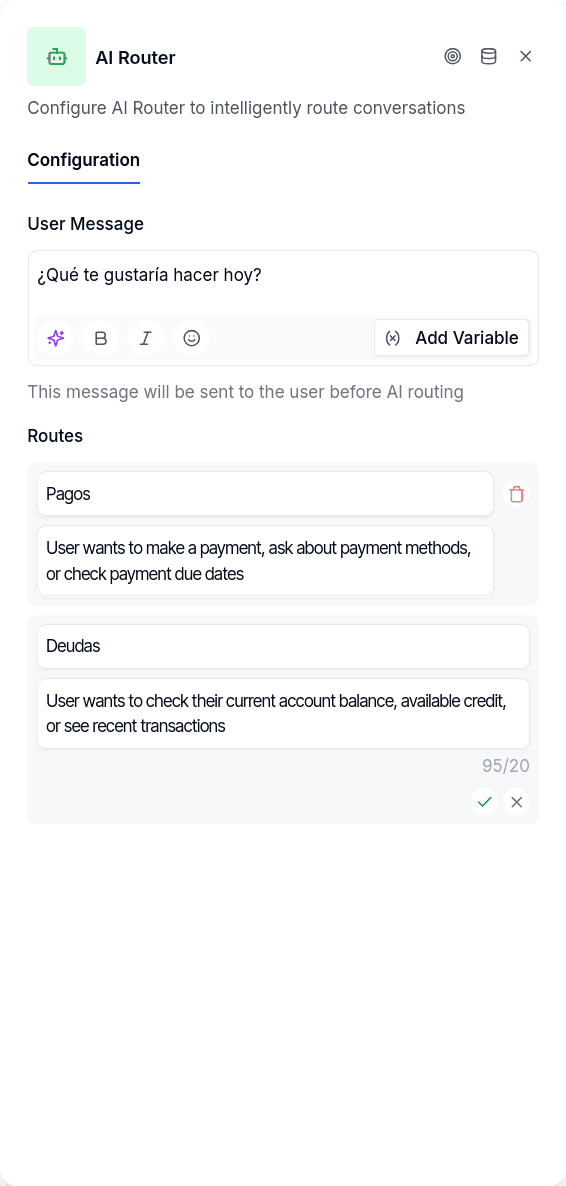
| Option | Description |
|---|---|
message | Prompt shown to user before waiting for input — supports {{variable}} placeholders |
routes | Array of routing options, each with a label and description |
Each route needs:
| Field | Description |
|---|---|
label | Short name shown on the handle (e.g., "Balance", "Support") |
description | What this route handles — the AI uses this to match intent (minimum 20 characters) |
Output Handles
| Handle | When |
|---|---|
| Each route | AI matched user intent to that route's description |
| Last route (fallback) | Classification failed or couldn't determine intent |
The last route always serves as the fallback. If the LLM can't classify the input or an error occurs, the conversation continues down that path. Make your last route a catch-all like "Other" or "Didn't understand" that loops back or offers alternatives.
Writing Good Descriptions
Route descriptions need at least 20 characters — the UI enforces this because short descriptions don't give the AI enough to work with.
Think of descriptions as instructions to a coworker: "Route here when the user wants to..." Include synonyms and alternate phrasings. For a support route, mention emotional signals: "User has a problem they can't solve, is frustrated, or explicitly asks for human help."
Each description should be clearly distinct from its siblings. If two routes sound similar, the AI will struggle to choose between them.
Things to Know
The message supports variables. You can include {{variable}} placeholders in the prompt, rendered at runtime with conversation data.
Confidence scores exist but don't affect routing. The AI reports whether it's high, medium, or low confidence, but the conversation proceeds regardless. There's no automatic retry for low-confidence classifications.
Empty responses trigger an error message. If the customer sends a blank message, the system asks them to repeat — it doesn't attempt classification.