Read Authorization
Read Authorization checks whether a customer has signed a specific authorization and routes accordingly. No message goes to the customer — it evaluates silently and branches TRUE or FALSE.
By default it reads the customer in the conversation. It can also read the authorizations of a different customer whose ID a flow variable carries — a guarantor resolved earlier in the flow, for example.
A third mode reads one specific authorization by its ID instead of searching a customer's authorizations, and can link it to a customer. Consent collected before anyone is identified no longer depends on it: the authorization is attached to the customer automatically when the conversation identifies them. This mode remains the manual path for older consents and special cases. See Consent Before the Customer Is Known.
What It Checks
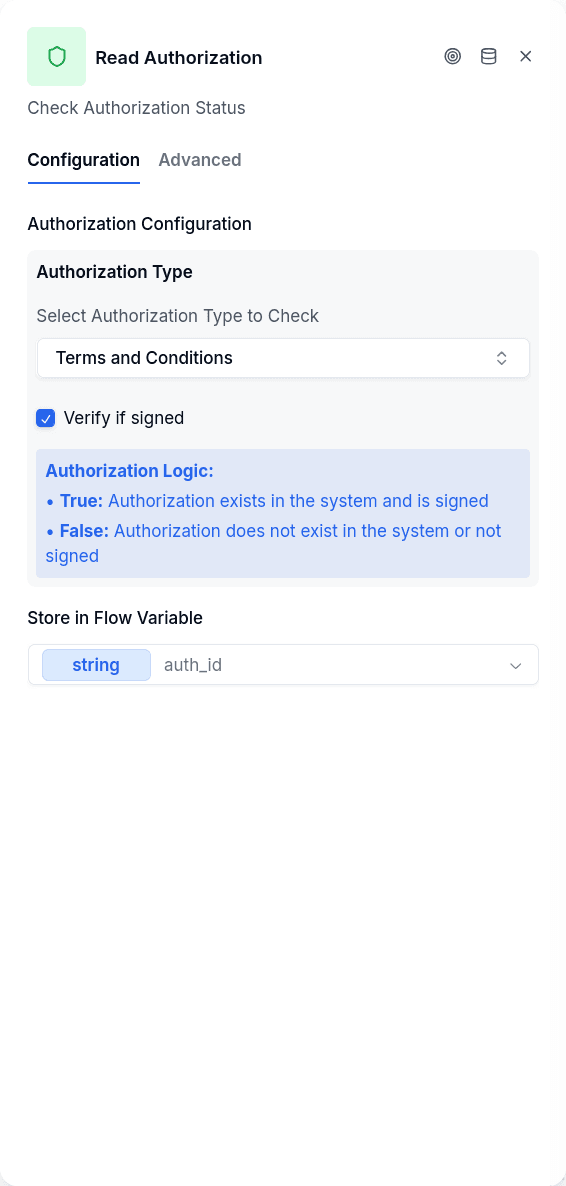
The node finds one authorization (see Authorizations API) and applies conditions in sequence. All must pass for TRUE:
- Does the authorization exist? When the node reads a customer, this means the customer has an authorization with the specified key. With Authorization ID, it means the ID in the variable belongs to an authorization in the tenant and, if an Authorization Type is set, that its key matches.
- If Verify if signed is enabled, does it have a signature?
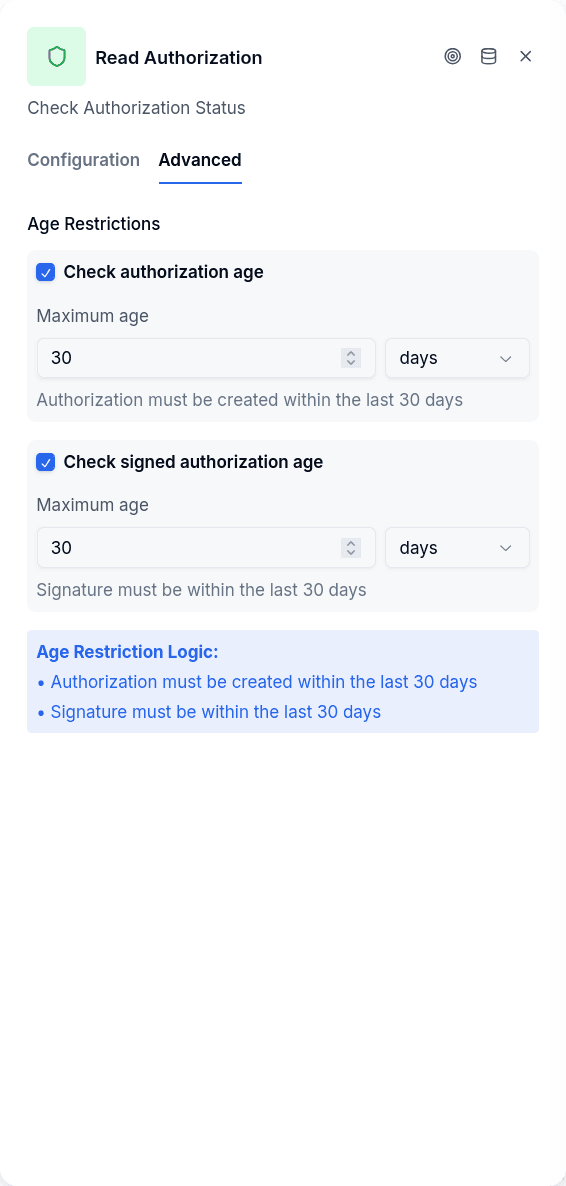
- If an age limit is set, is it recent enough?
Any check fails, FALSE.
When to Use It
Before requesting consent. A returning customer shouldn't re-sign terms they agreed to last week. Check first, skip the consent flow if already signed.
Compliance gates. Before sensitive operations — a bureau check, opening a credit line — make sure the required authorizations exist. If they are missing, send the customer through the Opt-In + OTP Verification flow.
Re-authorization flows. With age limits, check whether old signatures need renewal.
Checking a third party. A relationship node resolves the guarantor and leaves their customer ID in a variable; this node then reads the guarantor's authorizations instead of the titular's.
Consent collected before login. The customer accepts the terms at the start of the conversation, before Login or Create Borrower runs. The authorization is attached to the customer automatically when the conversation identifies them, so you do not need this node for that. Authorization ID mode is the manual path for consents accepted before that behavior existed, or for special cases. See Consent Before the Customer Is Known.
Configuration
| Option | Description |
|---|---|
| Authorization Type | The key identifying which authorization to look for (credit_bureau_consent, terms_and_conditions, etc.). With Authorization ID it is optional: when set, an authorization with a different key routes FALSE |
| Verify if signed | Require an actual signature, not just existence. If the authorization has signature evidences (AltScore QR signature), at least one is required; authorizations signed before evidences existed still pass on their OTP signatures |
| Authorization Age | Max age since the record was created (minutes, hours, or days) |
| Signature Age | Max age since it was last signed (minutes, hours, or days). Measured against the most recent signedAt among the signature evidences; when there are none, against the authorization's last update |
| Whose authorizations are read | Conversation's customer (default), Customer ID from a variable, or Authorization ID |
| Variable / Manual | With Customer ID from a variable: pick the flow variable that holds the customer ID, or type a fixed ID |
| Variable holding the authorization ID | With Authorization ID: the flow variable that holds the authorization ID — the one Opt-In wrote earlier in the same conversation |
| Link to a customer | With Authorization ID: off by default. When on, the authorization is linked to a customer if it has none yet |
| Conversation's customer / Customer ID | With Link to a customer: which customer it is linked to. Conversation's customer (default), or Customer ID, taken from a variable or typed as a fixed ID |
| Store in Flow Variable | Stores the authorization object for later use |
Whose Authorizations Are Read
Conversation's customer is the default and what every flow published before this option existed keeps doing: the node reads the customer linked to the conversation, with no variable involved. If the conversation has no identified customer yet, the node leaves a warning notice and takes the Error handle.
Customer ID from a variable reads a third party. Choose Variable and select the flow variable that holds the customer ID (a relationship node writes the guarantor's ID there, for instance), or choose Manual and type a fixed ID. The ID is verified to exist in the tenant before anything is read.
Two rules govern this mode:
- It never falls back to the conversation's customer. An empty variable, a variable no node ever set, or an ID that does not exist in the tenant produces a warning notice naming what to fix and routes through the Error handle. Nothing is read, so a question about the guarantor is never answered with the titular's data.
- The only guard is the tenant. No relationship between the two customers is required and the third party's consent is not consulted. Whatever ID lands in the variable — from an HTTP request, a URL parameter copied by a set-variable node — gets its authorization read. Treat that variable as sensitive: the stored authorization object includes the identity value and the IP address the authorization was created from (
ipAddress), and any variable can be interpolated into a message with{{name}}. Do not interpolate it into text the customer sees.
Authorization ID reads exactly one authorization: the one whose ID is in the selected variable, whoever it belongs to, and even if it belongs to nobody yet. The same caution applies to the stored object, and with Link to a customer on there is one more rule:
- The variable must be the one Opt-In wrote in this same conversation. The link is guarded only by the tenant and by the authorization having no customer yet. The node does not check who signed it or which conversation created it, and every Opt-In accepted in a conversation that never identified its customer leaves an authorization with no customer in the tenant. An ID that reaches the variable from a URL parameter, an HTTP request or another flow attaches someone else's consent to this customer, and since an authorization that already has a customer is never modified, no node can undo it.
The next section describes this mode.
Reading by Authorization ID
The node reads the variable and loads that authorization within the tenant; an ID from another tenant counts as not found. Then it goes in this order:
- Empty variable. If the variable is empty or was never set, the node leaves a warning notice naming the variable and routes FALSE.
- Not found. If no authorization with that ID exists in the tenant, it leaves a warning notice and routes FALSE.
- Different type. If Authorization Type is set and the authorization's key is a different one — a consent for another policy — it leaves a warning notice and routes FALSE. Nothing is linked.
- Link, only when Link to a customer is on. See the next section.
- The usual checks. Signature and age limits decide between TRUE and FALSE, exactly as in the other modes.
In the first three cases the variable in Store in Flow Variable, if set, is left empty, just as when a customer has no matching authorization.
Linking the Authorization to a Customer
With Link to a customer on, the node first resolves which customer to link:
- Conversation's customer uses the customer the conversation is linked to. If the conversation has no customer yet, nothing is linked: the node leaves a warning notice and goes on to the checks.
- Customer ID takes the ID from a variable or a fixed value and verifies that the customer exists in the tenant, with the same rules as Customer ID from a variable. An empty variable or an ID that does not exist in the tenant leaves a warning notice and routes through the Error handle.
Then one rule applies: an authorization that already has a customer is never modified.
| The authorization… | What happens |
|---|---|
| Has no customer | It is linked to the resolved customer, and the node leaves an info notice with the authorization ID and the customer ID |
| Already belongs to the same customer | Nothing to do, no notice |
| Already belongs to another customer | It stays as it is; the node leaves a warning notice naming both IDs and continues |
The link is written atomically, and only while the authorization still has no customer. If another conversation links it first, this node does not overwrite it: it reads the authorization again and applies the table above to what it finds.
The link happens before the signature and age checks and does not depend on them. An authorization too old to pass still gets linked, because the consent belongs to that person even when it has to be renewed. The object saved in Store in Flow Variable already carries the new customer ID.
Consent Before the Customer Is Known
A common flow asks for consent first and identifies the customer later. That order works on its own, and this node is no longer needed for it.
On WhatsApp and web, when the customer accepts, Opt-In saves the authorization even if the conversation has no customer yet. It is saved without a customer, signed with the channel address (the phone number on WhatsApp, the browser session on web), and tied to the conversation where it was accepted. No customer is created to hold it, and whatever the flow asks next stays in conversation variables.
As soon as that same conversation identifies the customer, the authorization is attached to them. Three things identify a conversation:
- Login, on any channel.
- Create Borrower with Authenticate Conversation on, when the node creates the customer.
- Identify Client, done by hand on the conversation from the chat.
The identifying node leaves an info notice, Authorization linked to customer, with the IDs of the authorizations it attached. From then on they are ordinary authorizations of the customer, so a Read Authorization in the default mode finds them. If attaching fails, the customer is still identified and the flow goes on; the node leaves a warning notice instead, and the manual path below can attach the authorization later.
The attachment has limits worth knowing before you design the flow:
- It needs the same conversation. If the customer starts over in a new one — another device, a private window, a restarted web session — the acceptance stays in the old conversation, and identifying them in the new one does not attach it.
- Create Borrower attaches only when it creates. With Find before creating on, a customer that already exists does not authenticate the conversation, so nothing is attached. That is deliberate: a tax ID is public, and authenticating from one would let anyone pass for that customer. Identify existing customers with Login and OTP.
- A conversation that never identifies the customer leaves the authorization without a customer, signed with the channel address. No placeholder customer is created.
- Email is outside this pattern. An Opt-In answered by email creates no authorization, so there is nothing to attach.
- An authorization that already has a customer is never rewritten, whoever attached it: a login, another conversation, or this node.
Linking by Hand
Consents accepted before October 14, 2026 were not tied to their conversation and still have no customer. For those, and for special cases such as linking to a customer other than the conversation's, use this node with Authorization ID:
- Opt-In, with Authorization Variable set to, say,
terms_authorization. - Optionally OTP Verification, pointing at
terms_authorization, to sign it. - Login or Create Borrower, so the conversation has a customer.
- Read Authorization with Authorization ID, the variable
terms_authorization, Link to a customer on and Conversation's customer as the target. If you use Store in Flow Variable, pick a different variable: the same one blocks publishing, because the node keeps the ID there and would never store the authorization.
OTP Verification can also go after this node instead of before Login. The variable keeps the authorization ID once the code is verified, expires or runs out of attempts, so either order reads and links the same authorization. The order only matters for Verify if signed: turn it on in this node when OTP Verification runs before it, and leave it off when OTP Verification comes later, because the signature does not exist yet.
In a new flow this node finds the authorization already attached by step 3 and has nothing to link; it still reads it and routes TRUE or FALSE, which is a convenient way to check the signature.
Output Handles
| Handle | When |
|---|---|
| TRUE | Authorization exists and passes all checks |
| FALSE | Missing, unsigned, or too old. With Authorization ID, also: empty variable, ID not found in the tenant, or a different authorization type |
| Error | The customer whose authorizations should be read could not be resolved (no customer in the conversation, empty variable, ID not found in the tenant). With Authorization ID, only when the link target is a Customer ID that is empty or does not exist in the tenant |
If the result is TRUE or FALSE but that output has no destination, the node leaves a warning notice and the conversation goes to the channel connector's default bot. Connect both outputs.
Publish Gate
Publishing is blocked when:
- Customer ID from a variable is selected and the variable (or the manual ID) is empty.
- Authorization ID is selected and no authorization ID variable is chosen.
- Link to a customer targets a Customer ID and the variable (or the manual ID) is empty.
- Authorization ID is selected and Store in Flow Variable is the same variable that holds the authorization ID.
Conversation's customer needs nothing else.
Prerequisites
With Conversation's customer, the conversation must already be linked to a customer — Login or Create Borrower must have run first; otherwise the node takes the Error handle. With Customer ID from a variable, the conversation itself needs no customer: only the variable has to carry a valid ID. With Authorization ID, the conversation needs a customer only when Link to a customer targets Conversation's customer; without one the node still reads the authorization, it just does not link it.
The authorization type must exist in the tenant's data model; referencing a nonexistent key routes FALSE, not Error.