Speech to Text
Speech to Text sends a prompt and waits for the customer to reply with a voice note. The audio is transcribed automatically and saved to a flow variable as plain text. If the customer sends a text message instead of audio, that text is accepted directly — no transcription happens, and the flow advances as normal.
This node is available in WhatsApp flows only. The web and email channels do not support audio.
How It Works
The node sends your prompt and the flow suspends, just as it does when an Ask Question node waits for input. When the customer records a voice note, it is downloaded from WhatsApp and transcribed using OpenAI's Whisper, a speech recognition AI model. The resulting text is stored in your chosen variable. There is no per-node language setting.
If the transcription comes back empty — background noise, silence, an unintelligible recording — the customer receives a retry prompt and the node stays put. There is no limit on retries. The retry message is currently hardcoded in Spanish: "No se pudo transcribir el audio. Por favor, intenta de nuevo."
WhatsApp silently rejects voice notes sent while any other node is active. The customer can only send audio when a Speech to Text node is waiting for it.
Configuration
| Option | Description |
|---|---|
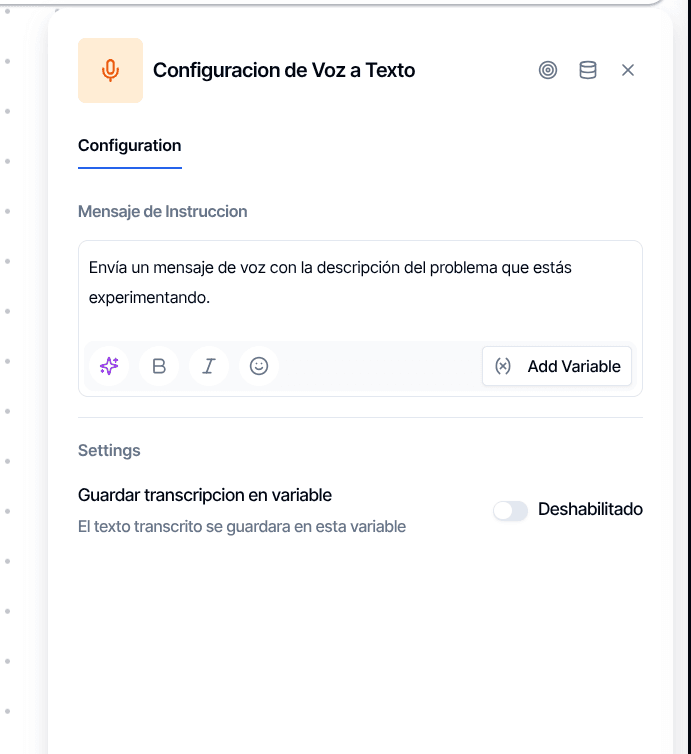
| Prompt message | The instruction sent to the customer. Supports {{variable}} placeholders. |
| Store transcription | Toggle on and name the variable where the transcript will be saved. Always name it yourself — if left off, the system generates an unwieldy ID like speech-to-text-abc123 that downstream nodes cannot reference reliably. |
When to Use It
Open-ended responses. Some customers find it easier to speak than type, especially for long descriptions, addresses with unusual names, or anything that benefits from natural explanation.
Voice-first data collection. Chain several Speech to Text nodes to collect form-like data entirely through voice — useful when voice notes are the primary way your customers use WhatsApp.
Pre-qualification interviews. Capture a spoken answer to a qualifying question, then pass the transcript to Extract Information to pull structured fields from what was said, or to a Conditional node to branch on keywords.
Output Handles
| Handle | When it fires |
|---|---|
| Success | Transcription completed and stored |
| Error | Transcription service failure |
Empty transcription (silent audio) does not trigger the error handle — it sends a retry message and the node keeps waiting.