Read Borrower
Read Borrower loads customer data from the database into conversation variables. It's the inverse of Customer Update: where Customer Update writes variables to the borrower's record, Read Borrower pulls stored data back into the conversation. Use it when you need to display customer information in messages, pass it to workflows, or use it in verification steps.
The node operates silently — no message goes to the customer. It fetches the requested fields, populates the variables, and proceeds immediately to the next node.
When to Use It
Loading identity data after authentication. A customer logs in, and the flow needs their name and ID number for subsequent steps — personalizing messages, populating PDF templates, or feeding verification nodes.
Preparing data for document generation. The flow needs the customer's cedula and full name to populate a contract template. Rather than asking the customer to re-enter information already on file, Read Borrower pulls it from the existing record.
Retry flows. Re-attempting a bureau authorization that failed earlier? Read Borrower retrieves the identity fields needed for the verification node without requiring the customer to re-authenticate or re-enter their credentials.
What It Can Read
Read Borrower accesses different compartments of a borrower's profile (see Borrowers API). Unlike Set Variable, which reshapes data already in the conversation, Read Borrower pulls from persistent storage.
Identity retrieves document information: person_id (cedula), tax_id (RUC), name, fingerprint_code, and other identity fields. These are singular values — one field, one value.
Borrower fields are custom key-value pairs defined per tenant. Any business-specific data stored on the borrower record can be read here.
Borrower (core entity) gives access to base fields like label and id.
Address, phone, and email return arrays — a borrower can have multiple of each. The variable receives the full collection, which you can then process with Set Variable if you need a specific entry.
Configuration
| Option | Description |
|---|---|
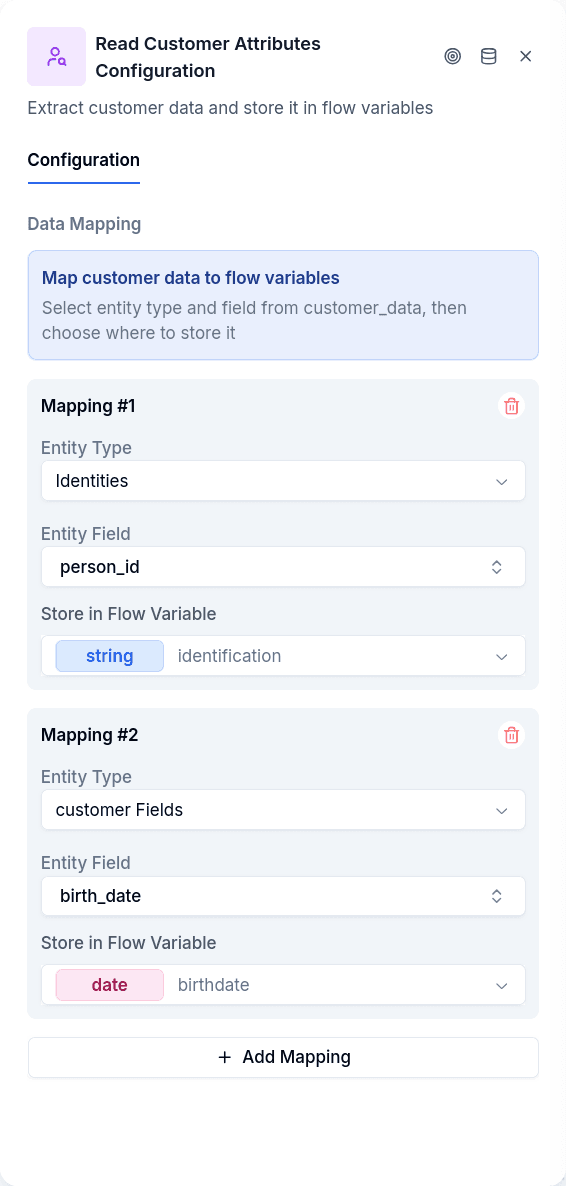
| Entity Type | What to read: identity, borrower, borrower_field, address, phone, or email |
| Entity Field | Which field within that entity (person_id, name, tax_id, etc.) |
| Flow Variable | Variable name to store the value in |
| Flow Variable Type | Data type of the variable (string, number, etc.) |
You can define multiple mappings in a single node — load the customer's name, ID, and fingerprint code all at once rather than chaining multiple Read Borrower nodes.
Output Handles
| Handle | When |
|---|---|
| Continue | Data loaded successfully |
The node doesn't branch on failure. If a requested field doesn't exist on the borrower's record, the variable is set to null and the flow continues.
Prerequisites
The conversation must be authenticated — a borrower_id must exist from Login or Create Borrower. Without an authenticated borrower, there's no record to read from.