Customer Update
Customer Update writes data permanently to the borrower's record. While nodes like Ask Question hold data temporarily in variables, that data vanishes when the conversation ends. Customer Update takes those variables and persists them to the database. Without it, everything collected during a conversation is lost.
The node operates silently — no message goes to the customer.
The Data Model
A borrower's profile (see Borrowers API) has several compartments that Customer Update can write to.
Identity stores official document information: national ID numbers, tax IDs, legal names. The system finds an existing record of that type or creates one if none exists.
Borrower fields are custom key-value pairs defined per tenant — the most common compartment. Use it for any business-specific data: customer segment, business type, onboarding progress trackers.
Step advances the borrower through workflow stages. Unlike other update types, step updates don't need a value — selecting the step key moves the borrower to that stage.
Borrower (the core entity) is rarely updated directly. The only common case is setting the label field.
This node doesn't handle addresses or points of contact — those are collections where a borrower can have multiple entries. For those, use Create Entity.
When to Use It
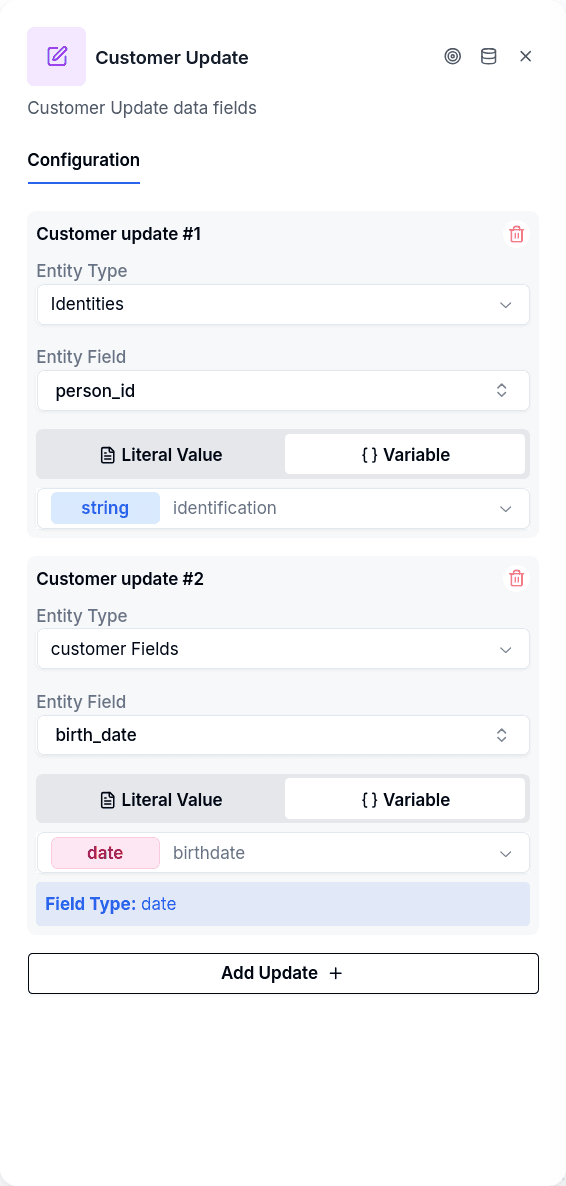
Persisting collected input. After Ask Question collects input into a variable, Customer Update makes it permanent. The customer enters their ID number into identity_value, then Customer Update writes it to identity.person_id.
Tracking multi-step progress. For processes spanning days, store progress in a borrower field like _whatsapp_onboarding_current_step. When the customer returns, a Conditional checks this field and routes them to the right place.
Saving selections. After Interactive Options, each branch can lead to a Customer Update with a static value matching what the customer chose.
Filing a document the customer sent. An Ask File node captured a photo of the ID into a variable; a Customer Update row with the variable type set to attachment attaches that file to the identity or document record.
Configuration
Each update targets a specific compartment and field, with a value from either a variable or a static string. You can add multiple updates to a single node — useful for saving all collected data at the end of a phase.
For identity and borrower field updates, choose whether the value comes from a variable or is a fixed value. For step updates, you only need the step key — no value required.
Which Customer Is Written
By default the node writes on the conversation's customer, the one Login or Create Borrower bound to the conversation. Every flow published before this option existed keeps doing exactly that.
Choose Customer ID from a variable and the node updates the fields on another customer: the one whose ID sits in the flow variable you pick. The typical case is a guarantor or co-signer that Create Borrower created a few nodes earlier, leaving its ID in a variable. The ID is checked to exist in the tenant before anything is written.
This mode never falls back to the conversation's customer: an empty variable, one no node wrote, or an ID that is not in the tenant leaves a notice naming what to fix and nothing is written. Publishing is blocked when Customer ID from a variable is selected and the variable is empty.
Reading a File from a Variable
A row whose variable type is attachment attaches one file to the target record. The variable is usually written by Ask File, and a file variable holds either one file or a list of them (an Ask File with Multiple files turned on writes a list). The row resolves what it finds by the shape of the value, not by the type the variable was declared with:
- One file. The row attaches it.
- A list of files. The row attaches only the first one and leaves a warning notice on the conversation: "The variable X holds N files; node conversational-borrower-update only uses the first one. Turn off multipleFiles in the ask-file that writes it, or read the files with a node that accepts several."
- No file. The variable is empty. The row leaves a warning notice ("The variable X has no file, so node conversational-borrower-update has no file to read... 'person_id' was left without the file; the other updates were applied."), the target field is saved without a file, and the remaining rows of the node are applied normally. The node still exits through Continue.
- Expired link. Files captured by Ask File are signed links that expire 60 minutes after capture. The row renews an expired link on its own; only when the renewal fails does it leave an error-level notice ("The file URL expired and could not be renewed. Ask the customer for the file again..."), and again the field is left without the file while the other rows are applied.
The publish gate anticipates the first two cases: the flow does not publish when an attachment row points at a variable that holds a list — written by an Ask File with Multiple files, an Extract Information with per-file results, or an attachments capture stored in an array variable — or at a variable that does not exist or is not a file type. See Publish Gate.
Output Handles
| Handle | When |
|---|---|
| Continue | All updates completed (a missing file only leaves a notice, see above) |
| Error | No customer identified, a variable-sourced value whose variable does not exist, or an update the record refused |
Every Error exit leaves a notice on the conversation with the cause, visible in the conversation's notices panel in Chat and aggregated in Flow Notices.
Connect the Error handle. Publishing warns when it is left unconnected. At runtime, a failure through an unconnected Error handle leaves a notice explaining that the node failed and had no Error handle, and the outcome depends on the channel: on WhatsApp the conversation is closed and handed to a human agent; on web and email the customer is sent to the channel connector's default bot — or, when it has none, the conversation is left without an active flow.
Customer Update vs Create Entity
Customer Update modifies singular fields: identity documents, custom fields, workflow steps. A borrower has one national ID value, one value for any given custom field.
Create Entity adds records to collections — phone numbers, addresses — where a borrower can have multiple instances, each with its own ID.
Store a phone number as text in a custom field? Customer Update. Need a verifiable POC that can receive codes? Create Entity.
Prerequisites
The conversation must have an identified customer — from Login, Create Borrower, Read Borrower or another node that identifies the customer earlier in the flow. When there is none, the node leaves a warning notice ("The conversation has no customer identified yet, so there is nothing to update") and exits through Error. Publishing warns about this too: a Customer Update with no identifying node anywhere before it in the flow gets the warning "No prior node in this flow identifies the customer...". If another flow identifies the customer before jumping to this one, you can ignore it.
For variable-sourced values, the referenced variable must exist. When it does not, the node leaves an error notice ("Variable 'X' not found") and exits through Error.
Things to Know
Borrower fields can be created on the fly. If the field key doesn't exist in your data model, it gets created when first written. However, fields should be pre-defined for proper typing and UI support elsewhere in the system.
Step updates have no value. When the entity type is "step", there's no value to configure — the step key alone advances the borrower to that workflow stage.
Files go on identity or document records. An attachment row attaches the file to the identity or document you target. Ask File can also file the upload directly through its destination setting, without a Customer Update.