Global Keywords
Global Keywords is an always-listening escape hatch. It monitors every message for specific keywords and immediately reroutes the conversation when one matches — regardless of where the customer currently is in the flow.
Think of it as a panic button or shortcut that works at any point. A customer types "ayuda" and gets transferred to an agent. They type "menu" and land back at the main flow. The keyword triggers instantly, interrupting whatever was happening.
Two Levels of Configuration
Global keywords operate at two distinct levels, each with different scope and behavior.
Connector-level keywords live in the Channel Connector settings, under the Advanced tab. These apply to every conversation on that connector, across all flows. When a customer types a connector-level keyword, the current flow is abandoned immediately — even mid-question — and the configured action fires. The available actions are transferring to a human agent or redirecting to a specific flow.
Node-level keywords are placed as nodes within a specific flow. They only listen while that flow is active. When triggered, they route to whatever node you've connected on the canvas. Unlike connector keywords that redirect to entire flows, node-level keywords can jump to any specific point within the current flow.
Connector keywords are checked first. If a message matches a connector-level keyword, node-level keywords never see it.
When to Use Each
Universal commands belong at the connector level. Keywords like "ayuda" for help, "agente" for human support, or "menu" to return to the main flow should work from anywhere. Place them in the Channel Connector settings where they're always active.
Flow-specific shortcuts belong at the node level. A multi-step onboarding flow might have "Salir" configured to jump back to the beginning if the customer wants to start over. That keyword only makes sense within onboarding — it shouldn't trigger from other flows — so it belongs as a node within that flow.
How Matching Works
Both levels share the same matching logic. Messages are first checked for exact matches, then fuzzy matches if no exact match is found.
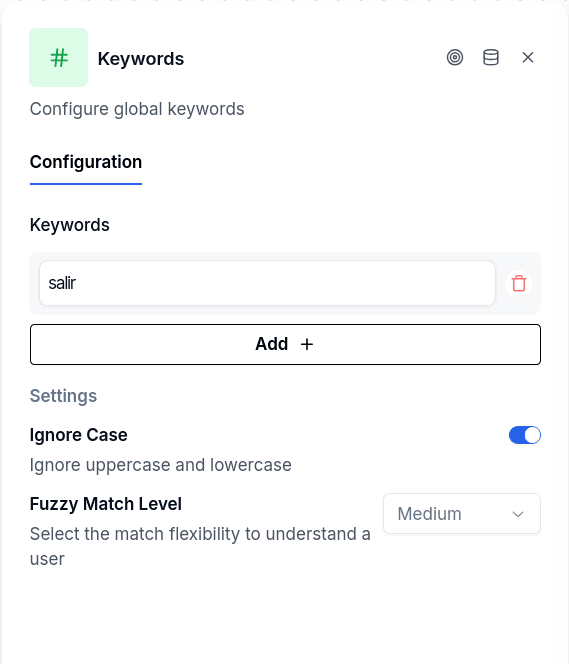
The Ignore Case setting controls case sensitivity. With it enabled, "SALIR", "Salir", and "salir" all match the same keyword.
The Fuzzy Match Level setting controls typo tolerance. At the "high" level, "Slair" and "Salri" might match "Salir". At "strict", only exact matches (modulo case) succeed. The fuzzy matching uses a token-based scoring algorithm, so very short keywords can produce surprising matches at high tolerance — be careful with one or two-character keywords.
Messages starting with "/" are never matched. These are reserved for system commands.
Configuring Node-Level Keywords
The Global Keywords node has no input handle — nothing connects to it. It floats on the canvas and listens passively while the flow runs. Each keyword you add creates an output handle, which you connect to the target node.
Add a keyword like "Salir" and connect its handle to a Jump To node that returns the customer to the beginning. When someone types "Salir" (or a fuzzy match like "salri"), the conversation jumps to that target.
If a flow contains multiple Global Keywords nodes, all of them are scanned on every message. First match wins.
Configuring Connector-Level Keywords
In the Channel Connector's Advanced tab, add keywords and their actions. Each keyword maps to either transferring to a human agent or redirecting to a specific flow.
The connector-level settings default to more forgiving values: case-insensitive matching and medium fuzzy tolerance. These defaults make sense for universal commands that should catch typos gracefully.
Things to Know
The node doesn't need incoming connections. This is unusual — most nodes sit in a chain. Global Keywords floats independently and intercepts messages while the flow runs.
Connector keywords override everything. When a connector-level keyword matches, the current flow terminates immediately. Any in-progress interaction is abandoned. Use this power carefully.
Missing targets fail silently. If a node-level keyword points to a deleted node, or a connector keyword references a non-existent flow, the match is logged but ignored. The conversation continues as if no match occurred.
Fuzzy matching on short keywords is risky. A two-letter keyword with high fuzzy tolerance will match almost anything. Keep keywords reasonably long or use strict matching for short ones.