Jump To
The Jump To node teleports the conversation from the current flow to another flow — or to a specific point within any flow, including the current one. When it executes, the conversation vanishes from where it was and reappears at the destination. The source flow is done; execution continues from wherever you landed.
This makes Jump To the primary tool for modularizing complex processes. A twelve-step onboarding doesn't fit on one canvas. Split it into separate flows, each handling one logical phase, and chain them together with Jump To nodes. Each piece becomes manageable on its own, testable in isolation, and the connection points are explicit.
When to Use It
Breaking apart large processes. When a flow grows too large to reason about, split it. Put each logical phase in its own flow and connect them with Jump To nodes. "Onboarding Step 1" ends with a Jump To that targets "Onboarding Step 2", which in turn jumps to "Onboarding Step 3", and so on. Each flow handles one concern, fits on one screen, and can be tested independently.
Converging error paths to shared handling. A "Failure and Support" flow handles errors and escalation. Many different flows need access to it: validation failures, document rejections, retry limits exceeded. Instead of duplicating error handling everywhere, each flow jumps to the shared destination when something goes wrong. Change the error handling once, and every path that uses it benefits.
Routing returning customers. A customer comes back after three days. Check where they left off and jump them directly to the right phase. Were they on step five? Jump to step five. New customer with no progress? Jump to account creation. The routing logic lives in one place, and Jump To handles the actual transfer.
Retrying without starting over. SRI validation failed, but the customer doesn't need to redo the entire flow. Show a "Let's try again" message and jump back to the validation node — same flow, but landing past the introduction. They skip the parts they've already completed.
Configuration
| Option | Description | Required | Default |
|---|---|---|---|
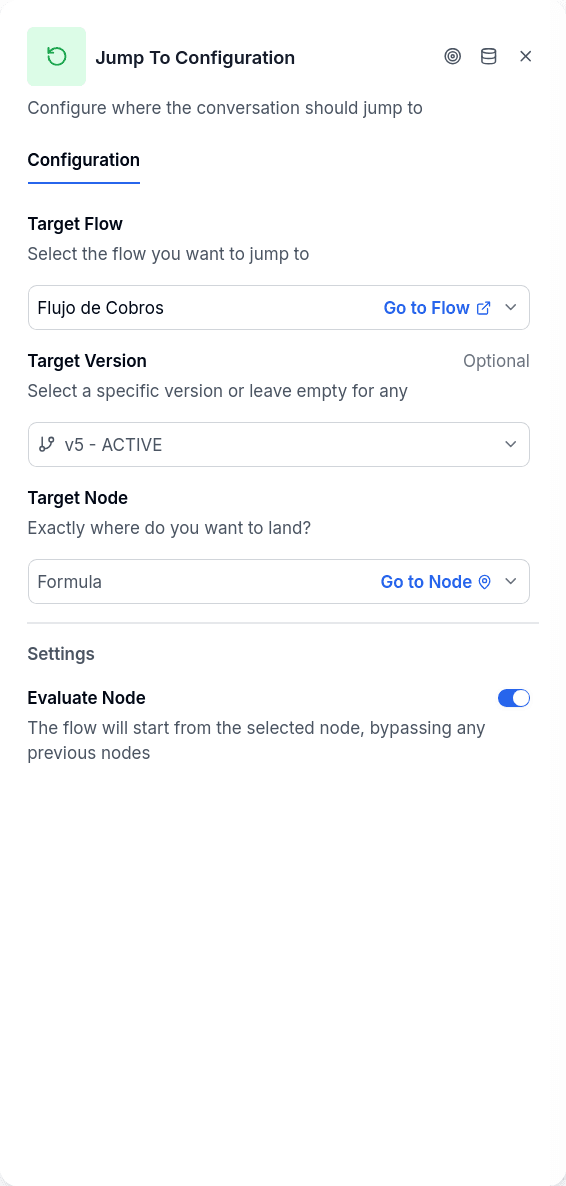
| Target Flow | The flow the conversation jumps to. It can be the flow you are editing. | Yes | Empty |
| Target Version | A specific version of the target flow. Leave it empty for Last published version. | No | Last published version |
| Target Node | The node to land on inside the target flow. | No | The first node after Start |
| Evaluate Node | Whether the destination node runs immediately on landing. | No | On |
How It Works
Configure the target flow and, optionally, a specific node within it. When the Jump To executes, the conversation's position updates: different flow, different node, potentially different flow version. Variables persist — they live on the conversation, not the flow, so anything you've stored remains accessible after the jump.
If you leave the target node empty, the conversation lands on the first node after the target flow's Start node. Start itself is skipped; you arrive at whatever meaningful node begins that flow.
A jump is a normal step, not a failure. The conversation keeps going in the destination flow exactly as if it had started there: it asks its questions, waits for answers and continues. Nothing is handed off to an agent and no failure notice is written because the flow changed.
Landing on a Specific Node
When you specify a target node, the conversation lands exactly there, skipping everything before it in the target flow. This is how retry patterns work: jump back to the validation step without repeating the greeting and setup that preceded it.
The target node must exist in the target flow. If it doesn't — perhaps it was deleted during editing — the system falls back to the flow's starting point.
On the Canvas
Jump To has an input handle but no output handle. Nothing can follow it in the source flow because execution has moved elsewhere. It's always a terminal node within its branch. The conversation continues in the target flow, not here.
This is different from End, which terminates the conversation entirely. Jump To transfers control; End stops everything.
Version Pinning
With Target Version left empty the picker shows Last published version: at runtime the engine loads the published (active) version of the target flow, whatever it is at that moment. This is the setting that keeps sub-flows current as you publish new versions of them.
If the target flow is under active development and you don't want work-in-progress to affect conversations mid-flight, pick a specific version from the list. Each entry shows its number, date and state (Published, Draft or Archived); choosing one records both the version and its state on the node, and the engine loads exactly that version regardless of what's been published since. An unpublished draft never runs unless you pin it on purpose this way.
Immediate vs Deferred Evaluation
The Evaluate Node setting controls what happens after landing:
When enabled (the default), the target node processes immediately. The conversation continues without pause — whatever that node does happens right away, and if it connects to further nodes, those execute too.
When disabled, the conversation state updates but processing stops. The conversation is left positioned on the target node and the system waits for the next message from the customer before that node executes. This is useful when you want to "park" the conversation at a specific point until the customer responds.
Publish Gate
The publish check looks at every Jump To in the flow:
| Rule | Result |
|---|---|
| No target flow selected | Blocks publishing |
| The target flow no longer exists | Blocks publishing |
| The target node no longer exists in the target flow | Blocks publishing |
| The target flow is archived | Warning |
Notices
A Jump To without a destination — no target flow, or a target flow that was deleted after publishing — no longer breaks the rest of the flow. Every other branch keeps working; the problem is only paid when a conversation actually reaches the node. At that moment the engine writes an error notice on the conversation, "The jump-to node has no destination, the flow stops here", pointing at the node, and the flow stops there. You see it in the conversation's notices panel in Chat and aggregated in Flow Notices, with a link that opens the node in the editor.
Things to Know
Same-flow jumps are valid. The target flow can be the flow you're already in. Combined with a specific target node, this creates retry loops that skip already-completed steps.
Keep your targets valid when reorganizing flows. Deleting or archiving a flow that other flows jump to is what the publish gate and the runtime notice above are for; check both before removing a flow.
Signal (Goal) nodes typically precede jumps. Track that a phase completed before transferring to the next phase. This keeps your analytics meaningful across multi-flow processes.