Liveness Verification
Liveness Verification confirms that a real person is present and matches their claimed identity. The node supports two providers with different mechanics: Uanataca (video + OTP, Ecuador only) and AWS Face Liveness (camera challenge in a dedicated microsite; EC, MX, CO, AR, US).
Both providers record the result as a Verification (type liveness) bound to the selected identity, so KYC queries them uniformly — only the provider differs (uanataca or aws).
Provider: Uanataca (Ecuador)
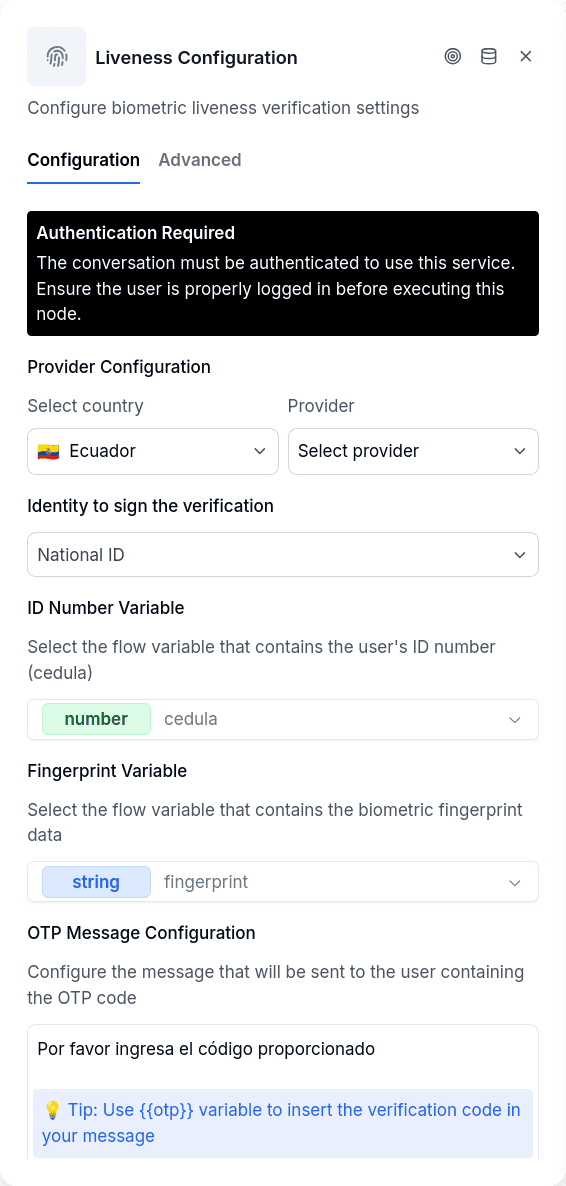
The system sends an OTP code to the customer, who must record a video of themselves saying the numbers aloud and send it back via WhatsApp. The service verifies liveness, face match against Ecuador's civil registry (using the cédula and the código dactilar collected earlier in the flow), and the spoken OTP. Once verified, the identity can be used to sign documents with Document Verifications.
| Option | Description |
|---|---|
cedulaVariable | Variable containing the customer's cédula number |
fingerprintVariable | Variable containing the fingerprint code (código dactilar) |
otpMessage | Message template — must include {{otp}} placeholder |
responseVariable | Where to store the verification ID |
storeInPackage | Create an audit record with verification result and metadata |
authToSign | Authorization variable to sign automatically on success |
Only video messages are accepted: if the customer sends text, an image, or audio, the system prompts them to try again and the flow stays on this node until a video arrives.
Provider: AWS Face Liveness
The customer receives a link to a secure microsite that runs the AWS Face Liveness camera challenge (no OTP, no video upload). The node creates a pending liveness verification and parks the conversation; when the challenge completes, the verification becomes verified or rejected and the flow resumes through the Success or Error handle.
| Option | Description |
|---|---|
country | Where the check runs: EC, MX, CO, AR or US |
selectedIdentityKey | Identity from the data-models catalog the verification is bound to |
linkMessage | Message sent to the customer with the microsite link |
confidenceThreshold | Minimum AWS confidence score to pass (optional) |
responseVariable | Where to store the verification ID |
storeInPackage | Create an audit record with the verification result |
testMode | Marks the verification as aws_test and skips the real challenge |
Use {{link}} inside the link message to control where the URL appears. If you leave {{link}} out, the link is appended automatically at the end of the message — the customer always receives it.
Output Handles
| Handle | When |
|---|---|
| Success | The provider verified the customer |
| Error | Configuration error, rejected verification, or a failed check |
Things to Know
Rejected also routes through Error. A completed-but-failed check (for example, low AWS confidence) takes the Error handle and leaves a notice with the reason.
The AWS session is created lazily. The microsite creates the AWS session when the customer opens the link, so links do not expire while the customer is idle in the chat.