Ask File
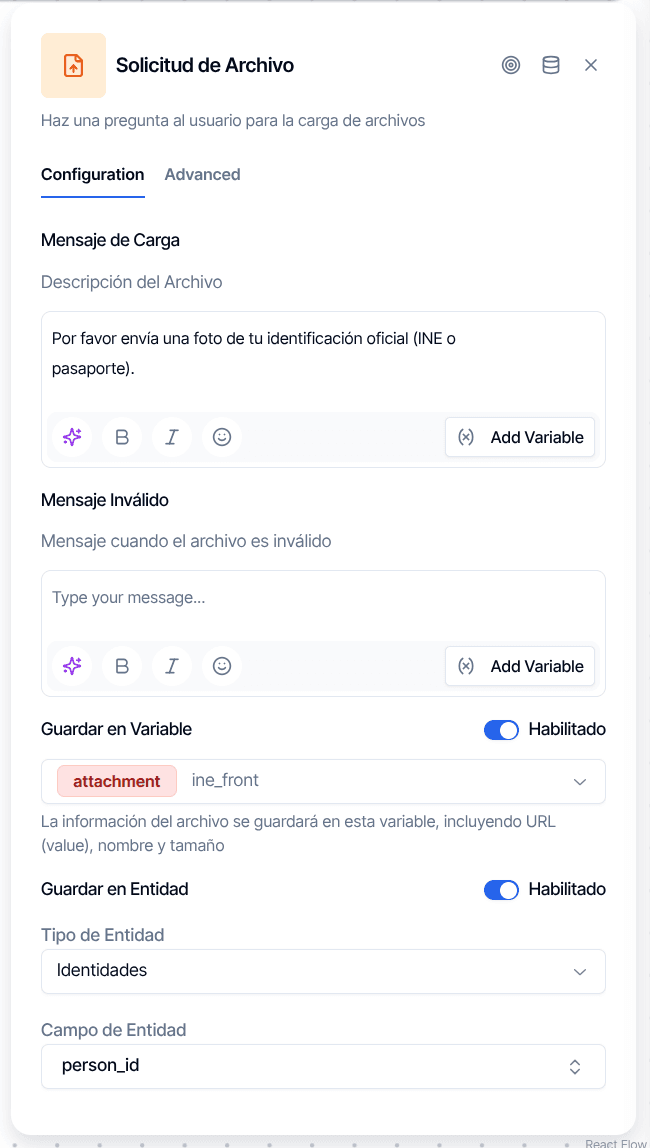
Ask File asks the customer for a document — a photo of their ID, a utility bill, a signed contract — waits for the upload and stores what arrives. By default it takes one file. With Multiple files on it collects a batch, so a customer can send the twelve invoices of the year in a single step.
What it receives goes to one or both of two destinations: a flow variable holding the signed URL (or the list of URLs), for nodes downstream such as Extract Information; and an attachment on a record of the customer — a document, an identity or an address. The node works on web, WhatsApp and email, with differences per channel explained below.
To file the answer in a customer's document and have it validated — in the background, or waiting for the verdict with one output per result — use Ask for Document instead.
Configuration
| Option | Description |
|---|---|
| Upload Message | What you ask the customer to send. Supports {{variable}} placeholders. If you leave it empty the node sends "¿Podrías enviarnos el archivo que te solicitamos?". |
| Invalid Message | Sent when the answer carries no usable file: text instead of an attachment, a media type the node does not take, or a "done" button pressed before sending anything. The node keeps waiting. Default: "Invalid file type. Please try again.". |
| Multiple files | Off: the node takes one file and stores its signed URL as a string in an attachment variable. On: it collects several files and stores the list of URLs, in the order they arrived, in an array variable. |
| File limit (optional) | Only with Multiple files. Maximum number of files accepted. Empty means no cap: the customer decides when to stop. Zero or a negative number count as empty. If a limit is left on a node that has the switch off, it is ignored and the conversation gets a warning notice. |
| Finish button label (optional) | WhatsApp only. Label of the button the node sends after each file so the customer can close the batch. Default: "Listo". |
| Save to Variable | Toggle on and pick the variable that receives the answer. The selector only offers attachment variables with the switch off and array variables with it on; flipping the switch clears the selection. |
| Save to Entity | Toggle on to attach the file to a record of the customer. Choose the entity — Identities, Documents or Address — and, for identities and documents, the key of the record (for example national_id). |
| Document name | Label the attachment carries in the customer's Documents panel. Supports {{variable}} placeholders. When empty the label is generated from the channel and media type, such as "WhatsApp image". |
| Entity ID Variable | Shown only when the entity is Address. The variable that holds the id of the address to attach the file to. Required: without it the node has no address to file the document on. |
| Clear All Attachments | Delete the attachments the record already had before writing the new file. With Multiple files it applies to the first file of the batch only, so the record ends up holding the whole batch and nothing older. There is no undo. |
| Metadata | Key-value pairs stored on the attachment. Keys accept letters, digits, _ and -. |
What Gets Stored
The variable holds the URL and nothing else. With Multiple files off it is a string with one signed URL, typed attachment. With it on it is a list of signed URL strings, typed array, one per file in the order the customer sent them. The file name and size are not part of the value; if a node downstream needs the name, it reads it from the file itself.
Variable and entity are independent. Either one alone is a valid configuration, and both together is common: the URL for the next node, the attachment for the customer's record. The variable is written first, so the customer's answer is already saved if the entity write fails afterwards.
Signed URLs expire after 60 minutes, but that is rarely a problem: every node that reads a file from a variable renews an expired URL on its own before using it. See Variables for how file variables travel through a flow.
Behavior per Channel
The way a batch closes depends on what each channel offers, and the node adapts to it.
Web
The upload message is the answer: the customer picks the files and sends them once. With Multiple files the picker accepts a whole selection and that single send closes the step — there is no "done" button and no adding files afterwards. If the customer selects more than the File limit, the portal tells them how many it kept; the node keeps the first N and leaves a files_over_limit warning notice on the conversation.
The portal accepts pdf, csv, doc, docx, xls, xlsx, jpg, jpeg, png, mp4, json, zip, heic, heif, webp and txt, up to 20 MB per file. Anything else is refused before it leaves the browser.
If the customer writes text without attaching anything, the node resends the Invalid Message as a new file request, so the upload buttons stay available, and leaves the warning notice "Answer without a file, node repeated". If a file is received but cannot be written to storage, the node also asks again, and the notice is an error with code answer_unresolved.
WhatsApp delivers one media per message, so a batch is built one file at a time. With Multiple files on, after each file the node replies Recibimos {n}. Envía otro archivo o toca "Listo" cuando termines. with a button labelled with the Finish button label. The batch closes when the customer reaches the File limit, taps the button or types its label. Only then is the list written to the variable; attachments to the entity are written file by file as they arrive.
A text message between two files does not close the batch: the node answers with the Invalid Message and keeps waiting. Tapping "Listo" before sending any file is not an answer either — the node sends the Invalid Message and the step stays open.
Only images and documents count as files on WhatsApp. A video or a voice note gets the Invalid Message and leaves an unsupported_media_type warning notice. Files keep the name the customer's phone sent when there is one (documents carry it, photos usually do not); otherwise the node names them image.jpg, document.pdf and so on from the media type.
The media is downloaded from WhatsApp once and stored on the incoming message; the entity receives a copy of that stored file. Deleting attachments from the entity never touches the message's file.
A batch belongs to the node that opened it. If the flow reaches a second Ask File later on, it starts empty.
A reply carries all its attachments at once, so email reads like web: the reply is the complete answer, Multiple files off keeps the first attachment, and attachments over the File limit are dropped with the same files_over_limit warning. A reply with no attachment gets the Invalid Message back and the node keeps waiting. Entity destinations, Document name and Clear All Attachments work exactly as on web.
Destinations on the Customer's Record
Documents. The node selects the customer's document with the chosen key or creates it. If the upload fails on a document it just created, the empty document is removed so the record does not collect blanks.
Identities. Same select-or-create by key, for identity records such as national_id.
Address. The address comes from the Entity ID Variable. Two cases route the node through the Error handle: the variable is not configured (warning notice answer_without_destination: "File not attached: the node does not say which address"), or the id points to an address that does not exist or belongs to a different customer (warning notice "File not attached: that address is not this customer's"). An address is only accepted when it belongs to the customer of this conversation, because a variable can carry a value typed in a URL.
Borrower field. Older flows may still have a borrower field as destination. Borrower fields hold a value, not attachments, so the file is not written there; the node leaves a destination_cannot_hold_files warning saying where the file is (the variable, or nowhere) and continues. Move the destination to a document or an identity.
Without an Identified Customer
Identities, documents and borrower fields belong to a customer. If the conversation has not identified one yet — no Login or Create Borrower ran before — the node skips the entity write, keeps going and leaves an entity_without_customer warning: "The file was saved to the variable but not to the customer's record" when a variable is configured, or "The file was not stored: the conversation has no customer yet" when it is not. Identify the customer before this node, or take the entity off it.
The node never takes the customer from a flow variable. Identity is decided by the login node.
Output Handles
| Handle | When it fires |
|---|---|
| Success | The answer was received and stored; the flow continues even if a warning notice was left. |
| Error | An address destination was refused or has no id variable, a file could not be attached to the entity, or WhatsApp did not accept the upload message. |
Invalid input never fires Error: text, unsupported media or a premature "done" get the Invalid Message and the node keeps waiting. There is no retry limit.
Publish Gate
Publishing is blocked when:
- The node has no destination: neither a variable nor an entity. The message reads "There is nowhere to store the answer. Choose a variable or an entity". An address destination only counts when its Entity ID Variable is set.
- The variable type does not match the switch: an
attachmentvariable with Multiple files on, or anarrayvariable with it off. - File limit is filled with something that is not a whole number greater than zero.
- A node downstream that reads one file — OCR verification, face verification, Create Asset, a Customer Update attachment — points at this node's variable while Multiple files is on. The gate names the writer: turn the switch off or point that node at another variable.
See Structural Rules for the rest of the checks a flow must pass before it goes live.
Notices This Node Can Leave
Notices appear in the conversation's notices panel in Chat and aggregated per flow and node in Flow Notices.
| Code | Level | When | What to do |
|---|---|---|---|
answer_without_destination | Warning | Files arrived and the node has neither variable nor entity, so they were discarded. Also an address destination with no Entity ID Variable. | Pick a variable or an entity; for addresses, pick the variable that holds the address id. |
answer_unresolved | Warning / Error | A variable is configured but no URL could be produced for the files (warning), a file never reached storage and the customer was asked again (error), or an email reply carried no attachment (warning). | Check the channel's media download and file storage if it repeats. |
entity_without_customer | Warning | The entity destination needs a customer and the conversation has none yet. On email, an address that is not this customer's also carries this code. | Identify the customer before this node, or remove the entity. |
files_over_limit | Warning | Web or email: the customer sent more files than the File limit; the first N were kept. | Raise the limit or tell the customer how many to send. |
unsupported_media_type | Warning | WhatsApp: a video or voice note arrived; it was refused with the Invalid Message. | Nothing to fix in the flow; adjust the Invalid Message if customers keep sending the wrong type. |
destination_cannot_hold_files | Warning | The destination is a borrower field, which cannot hold attachments. | Move the destination to a document or an identity. |
node_warning | Warning | A File limit is set on a node whose Multiple files switch is off; the limit was ignored. | Turn the switch on or clear the limit. |
node_failed | Error | WhatsApp did not answer, or answered without a message id, when the node sent the upload message. The node takes the Error handle. | Check the WhatsApp connector and the number's status. |
Without a code, the notice "Answer without a file, node repeated" (warning) records a web answer that carried no attachment, and "File not attached: that address is not this customer's" (warning) records a refused address.
When to Use It
KYC document collection. Request a government ID photo and attach it to the customer's identity record with entity Identities and key national_id.
Proof of address. Collect a utility bill or bank statement and attach it to an address created earlier in the flow by Ask Location, whose variable holds the address id.
A batch of documents to read. Turn on Multiple files, store the list in an array variable and chain an Extract Information node with One result per file to get one structured result per document.
Things to Know
Clear All Attachments is permanent. The existing attachments are deleted before the new file is written. With a batch, only the first file clears; the rest append.
The finish button defaults to "Listo". Type your own label if your customers speak another language; the customer can also type the label instead of tapping the button.
The acknowledgement after each WhatsApp file has no editor. The text Recibimos {n}. Envía otro archivo... is fixed from the panel; only the button label is configurable.
Nothing from a file's name or size reaches the variable. Plan downstream nodes around a URL, or a list of URLs, and nothing more.