Set Variable
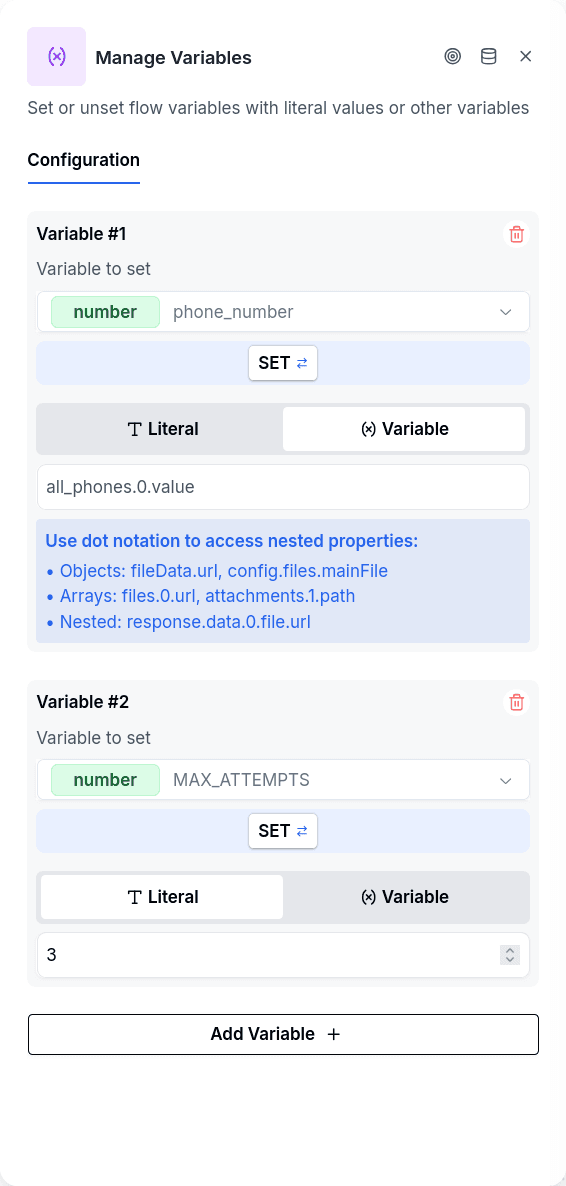
Set Variable transforms and extracts data within a conversation. When a workflow or Python executor returns a nested response, other nodes can't use it directly — the data sits buried in object properties and array indices. Set Variable reaches into those structures using dot-notation paths (info_sri.output.data.0.activity), pulls out the specific values you need, and stores them as simple variables the rest of your flow can reference. Numbers in the path are array indices.
The node operates silently — no message goes to the customer. It processes the configured extractions and proceeds immediately to the next node.
When to Use It
After external integrations. A typical pattern follows a Workflow Execute, Formula, or Python Executor node. These integrations return structured responses with nested data. Set Variable unpacks what you need — extract info_sri.output.data.0.activity into activity, then a Conditional can check it, a message can display it, or Customer Update can persist it to the borrower's record.
Initializing counters for retry logic. Before entering a loop that might fail, set attempts to 1 and MAX_ATTEMPTS to 3. When the loop fails, a Conditional checks whether to retry or give up.
Configuration
| Option | Description |
|---|---|
| Variable Name | The variable to create or update |
| Data Type | string, number, boolean, date, object, array, or attachment |
| Mode | set to create/update, unset to delete |
| Value Type | literal for hardcoded values, variable for path extraction |
| Source Variable | Path to extract from (e.g., info_sri.output.data.0.activity) |
You can define multiple variables in a single node. Path traversal uses dot notation — numbers in the path are array indices. Keys with dashes, such as ARG-PUB-0003, are fine; a key that itself contains a dot cannot be addressed, because the path is split on dots.
Building the Path From a Sample
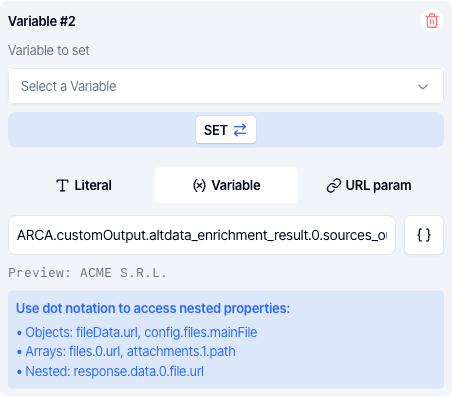
A nested response only exists at runtime, so typing its path by hand is guesswork. Next to the source path there is an explorer: paste a sample of the value the variable holds (copied from an execution, for instance), and click the key you need. The full path is written for you, list positions included, and a key the engine cannot read shows as disabled with the reason.
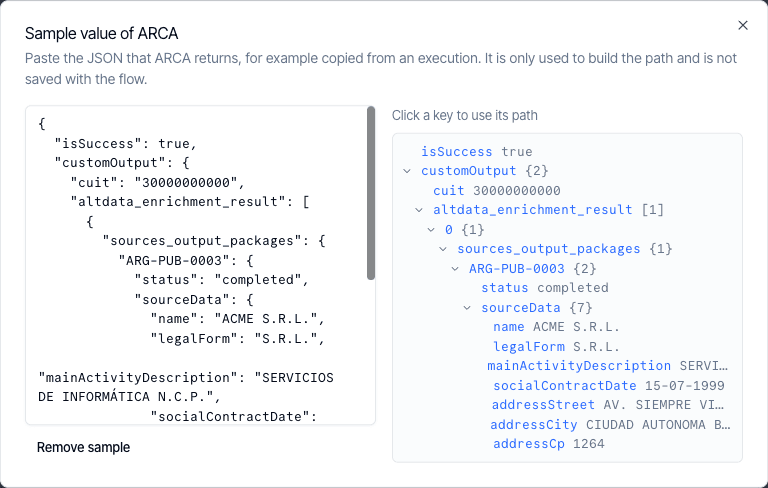
While a sample is loaded, a preview under the path shows the value it resolves to against that sample, or the exact reason it does not, in the same words the engine uses in its notices. The sample is only used while you edit and is not saved with the flow.
Keep Data Type equal to the type the variable is declared with in the variables panel. The declared type is the contract the rest of the flow reads: the publish check validates against it, and when a node saves a value that does not fit the declared type the engine keeps the declared type and writes a warning notice naming the variable and both types (see Variables). Declaring number here and string in the panel is asking for that notice on every run.
A literal is stored exactly as you typed it, converted to the Data Type. Placeholders are not interpolated in a literal: {{other}} is saved as that text, not as the value of other. To copy or reshape another variable, use Value Type variable and a Source Variable path.
Unlike Customer Update, which writes to permanent storage, Set Variable only affects the current session. Extract and reshape data here, then persist the final values with Customer Update.
Output Handles
| Handle | When |
|---|---|
| Continue | Processing completed |
Notices
The node never stops the flow over a value it could not produce; it continues and leaves a warning notice on the conversation so you can see what happened:
| Situation | What is stored | Notice |
|---|---|---|
| The source path does not exist — the base variable is missing, a property is absent, an array index is out of range | null | "could not resolve source ... (stored as null)" |
| The value cannot be converted to the Data Type (text that is not a number, an object that is not valid JSON) | The raw value, unconverted | "could not convert its value ... (stored the raw value)" |
| A variable was discarded by the mode filter | Nothing | "was discarded ... (the variable was not set)" |
If you traverse to an array without specifying an index, you get the whole array; use .0 to extract the first element when you need a single value. Notices appear in the conversation's notices panel in Chat and aggregated in Flow Notices.