Send Credits Information
Send Credits Information retrieves a customer's credit records from the Credit Management System — outstanding balances, payment schedules, days past due, and loan terms. The customer must be authenticated and linked to CMS; otherwise the node routes to error.
When to Use It
Collection flows. When you need to show customers how much they owe, how many days they're overdue, and how to get current.
Account status. Let borrowers check their current loan status, remaining balance, and payment schedule.
Payment reminders. Display upcoming due dates and amounts so customers know what's coming.
The node returns an array of debt objects. Each includes the full payment schedule, current balance breakdown, and status. You can filter by status and substatus — for example, fetching only active loans that are overdue.
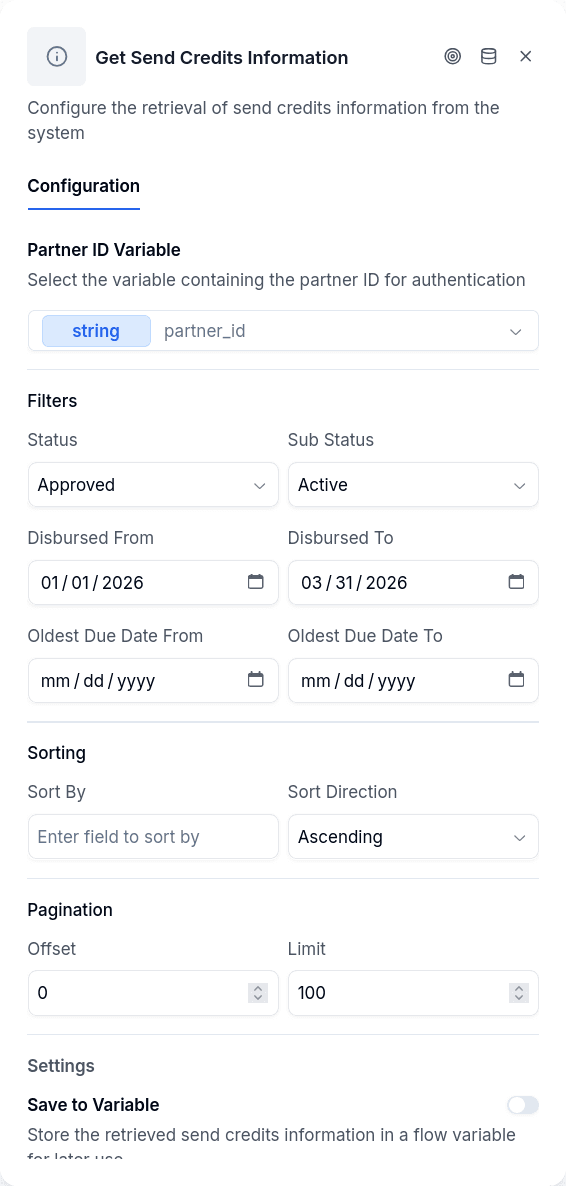
Configuration
| Option | Description |
|---|---|
partnerIdVariable | Variable containing the partner ID for CMS authentication (required) |
selectedVariable | Variable where the debt array will be stored |
sendText | Send the result as text. Off by default. When on, the node also sends the customer a fixed text with the credits. See Text for the Customer |
textLanguage | Text language: Spanish or English |
textVariable | Save the text in a variable. Optional string variable that receives the same text |
Filters
| Option | Description |
|---|---|
status | Lifecycle status: pending, approved, active, closed |
subStatus | Detail status: overdue, due, paid, writeOff, canceled, refinancing, refinanced, active, rejected |
disbursedFrom | Debts disbursed on or after this date (YYYY-MM-DD) |
disbursedTo | Debts disbursed on or before this date |
oldestDueDateFrom | Oldest due date on or after this date |
oldestDueDateTo | Oldest due date on or before this date |
Pagination
| Option | Description |
|---|---|
offset | Skip first N records (default 0) |
limit | Maximum records to return (default 100, max 1000) |
sortBy | Field to sort by |
sortDirection | asc or desc (default asc) |
Set the partner ID earlier in your flow using a Set Variable node.
The output variable receives an array of debt objects. Each debt includes client info, loan terms, the full installment schedule, current balances, and days past due. See CMS Debts API for the complete response structure.
To display debt information to customers, reference the array in a Message node. You might show {{overdue_debts[0].balance.total.amount}} for the outstanding amount or {{overdue_debts[0].daysPastDue}} for days overdue.
Text for the Customer
Under Text for the customer, the Send the result as text switch makes the node send the customer a fixed text with the credits it just fetched, so you do not have to build that message from the array yourself. The text is not a template and cannot be edited: you only choose its language, and the editor shows a read-only preview with fictitious data.
There is one block per credit. Reference appears only when the credit has one; Status shows the substatus when there is one, otherwise the status; and Next payment is the first installment that is not paid, shown only when there is one. Values go out exactly as the CMS returns them: statuses and dates untranslated, each amount as its number followed by its currency, and - when a value is missing. In English:
In Spanish:
When the customer has no credits, the text is "You have no credits on record." or "No tienes créditos registrados."
On WhatsApp the text goes out as a WhatsApp message, and on every channel it is saved in the conversation as a message from the bot, which is how the web chat shows it. A WhatsApp message holds at most 4096 bytes, so a long list (the node fetches up to 100 credits by default) goes out in several messages, split between credits. With Save the text in a variable, the same text is also stored as a string. The debt array is still saved in selectedVariable exactly as before, and flows saved before this option send nothing.
Output Handles
| Handle | When |
|---|---|
| Continue | Debts retrieved successfully |
| Error | Missing configuration, borrower not linked to CMS, API failure, or the text could not be sent |