Ask Email
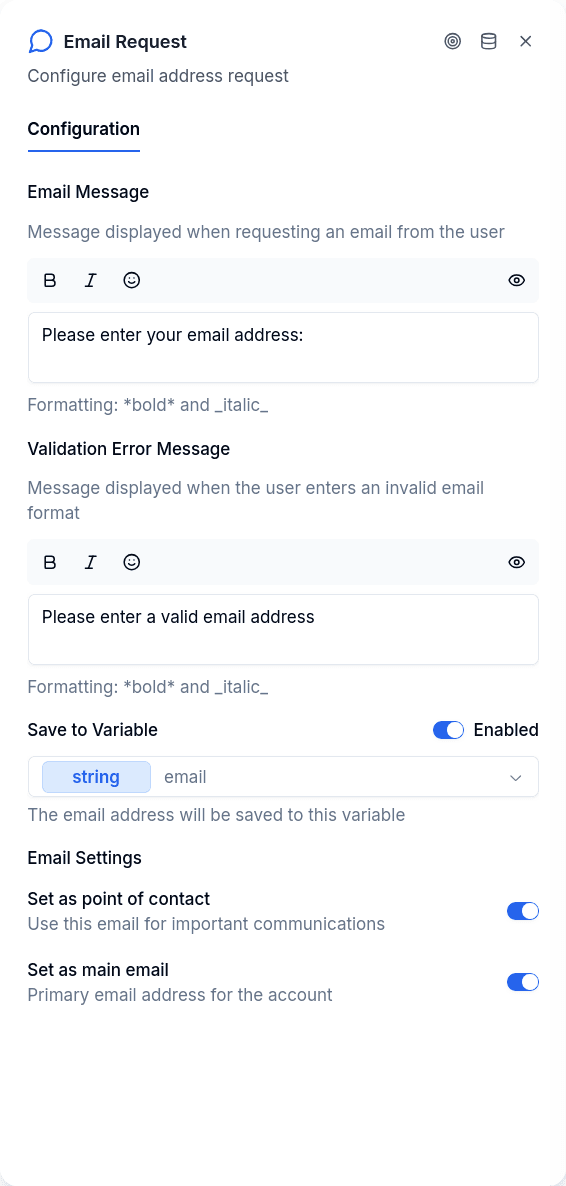
The Ask Email node requests an email address from the customer and validates the format before proceeding. Use it when you need to collect contact information and want to ensure it's a properly formatted email.
How It Works
The node sends your prompt message, waits for the customer to reply, and validates their input against an email pattern. If the format is invalid, it shows an error message and asks again. Once valid, the email is saved and the flow continues.
The prompt accepts {{variable_name}} placeholders. A variable that nothing has set when the node runs is not replaced — the customer sees {{variable_name}} as written and the node writes one warning notice on the conversation listing the unresolved names.
The node is available on the WhatsApp and web channels. Email flows do not offer it in the editor.
Validation
The node checks that the input looks like a valid email address: characters before an @ sign, a domain name, and a top-level domain of at least two characters.
What passes:
user@domain.comuser.name@sub.domain.cofirst_last@company.org
What fails:
user@(no domain)@domain.com(no local part)user@domain(no top-level domain)user@domain.c(TLD too short)
When validation fails, the node displays your configured error message and waits for another attempt.
When to Use It
Collecting contact information. You need an email address to reach the customer later. The node validates the format and can save it as a Point of Contact on their borrower record.
Requesting a secondary email. The customer already has a primary email on file, but you need an additional contact. Save as a Point of Contact without marking it as the main email.
Storing for later use in the flow. You just need the email as a variable to use elsewhere in the conversation, without saving it to the borrower record.
Saving as Point of Contact
When the Point of Contact toggle is enabled, the email is saved directly to the customer's borrower record — not just as a conversation variable. This requires the borrower to already exist in the system; use Login or Create Entity first.
Setting the Main Email toggle marks it as their primary contact email, which the system uses for notifications and campaigns. When a borrower has multiple emails, the one marked as main takes priority.
For more on how contact information is stored and managed, see the Points of Contact API.
Verification
Points of Contact start unverified. If you need to confirm the customer actually controls the email address, follow up with the POC Verification node.
Publish Gate
| Rule | Result |
|---|---|
| No prompt message | Blocks publishing: "Email request message is required" |
| No validation error message | Warning: "Validation error message is not configured". The node still asks again on an invalid answer, but the customer gets no explanation of what was wrong |
Output Handles
| Handle | When it fires |
|---|---|
| Success | Valid email entered and saved |
| Error | Borrower not found (when saving as Point of Contact), or system failure |