Working with the List of Similar
The List of Similar is a tool that allows the user to select the correct identity values of a borrower from a list when a query to an external source returns multiple options, and it is not possible to automatically select the correct one.
Understanding Similar Lists
At AltScore, lenders use various processes designed to offer higher-quality credit products by better understanding their potential borrowers and evaluating the risks of lending to them. These processes, called workflows, are composed of a series of tasks developed to the specific needs of each lender.
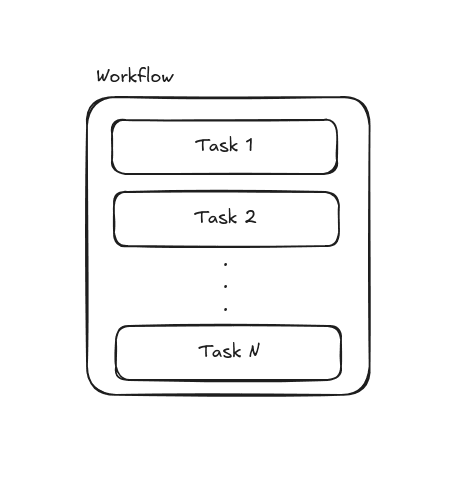
While workflows are adapted to meet the needs of each client, many use cases are similar. In this guide, we will focus on the use case of Origination, which involves assessing the credit risk of a borrower and helps our clients decide whether to approve a loan.
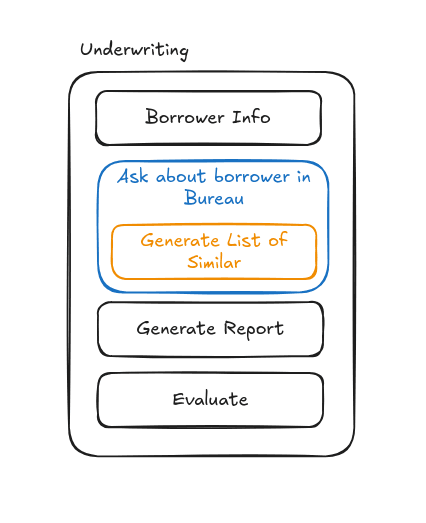
 In this example, the workflow consists of four steps: obtaining borrower's information, querying an external data
source (bureau), generating a report with the collected information, and conducting a credit evaluation.
In this example, the workflow consists of four steps: obtaining borrower's information, querying an external data
source (bureau), generating a report with the collected information, and conducting a credit evaluation.
In many cases, queries to data sources do not directly provide the specific information of the borrower. Instead, they return multiple options, and identifying the correct one may not be an automatic process. Referring to the previous example, if the correct information cannot be automatically determined, the report cannot be generated and the information won't be passed to the next task, resulting in a credit evaluation based on incomplete data.
This is why the Lists of Similar are needed
The List of Similar create a manual process where a user could decide which of the candidates provided by the data source corresponds to their client. Therefore, the workflow implementer must take this into account when designing any task that might retrieve a list of candidates from the consulted data source.
Implementing a Similar List in Workflows
Now that we understand the utility of the Lists of Similar, we can implement a task in the Origination workflow of this lender to handle scenarios where the data source returns multiple candidates.
Example
Let’s assume we have a fictional data source called External Credit, which provides company credit history through an
SDK using a specific company ID. Additionally, External Credit allows retrieving this ID using
the find_clients_by_name search method.
The lender, in turn, has configured an identity field named external_credit_id to store this special ID associated
with the data source. This field will be used by the task that later queries the borrower’s credit history in External Credit.
With this in mind, we can proceed to the implementation.
List of Similar States
Pending (pending)
The Similar List is visible to the user, who can select one of its elements. At this point, if the user selects an
element, the borrower's fields will be updated, and the list will transition to the applied state. If no match is
found manually, the user can mark the list as no hit.
Applied (applied)
The list is no longer visible to the user and stores the index of the selected element. The borrower's fields are updated based on the selected list values.
No Hit (no hit)
The list is no longer visible to the user. The borrower remains unchanged.
Expirada (expired)
The list is no longer visible to the user. This state only applies when a new list is created for the same borrower
while the previous one was still pending.
It is important to note that any operation on a list in a state other than pending will not
make any changes and will raise an error.